Author Topic: KiCad Breadboard Builder  (Read 2236 times)

0 Members and 1 Guest are viewing this topic.

Offline ObinTopic starter

  • Regular Contributor
  • *
  • Posts: 137
  • Country: be
  • Hi
    • nacho.works
KiCad Breadboard Builder
« on: May 12, 2026, 04:19:05 pm »
Hi!

To whom it may concern:

For an EE class I teach, I made a plug-in for KiCad that allows users to create a breadboard version of their schematic. Components are added to the view, after which you can place them on your breadboard and validate the build once you’re happy with it.

https://github.com/kerstensrobin/kicad-breadboard
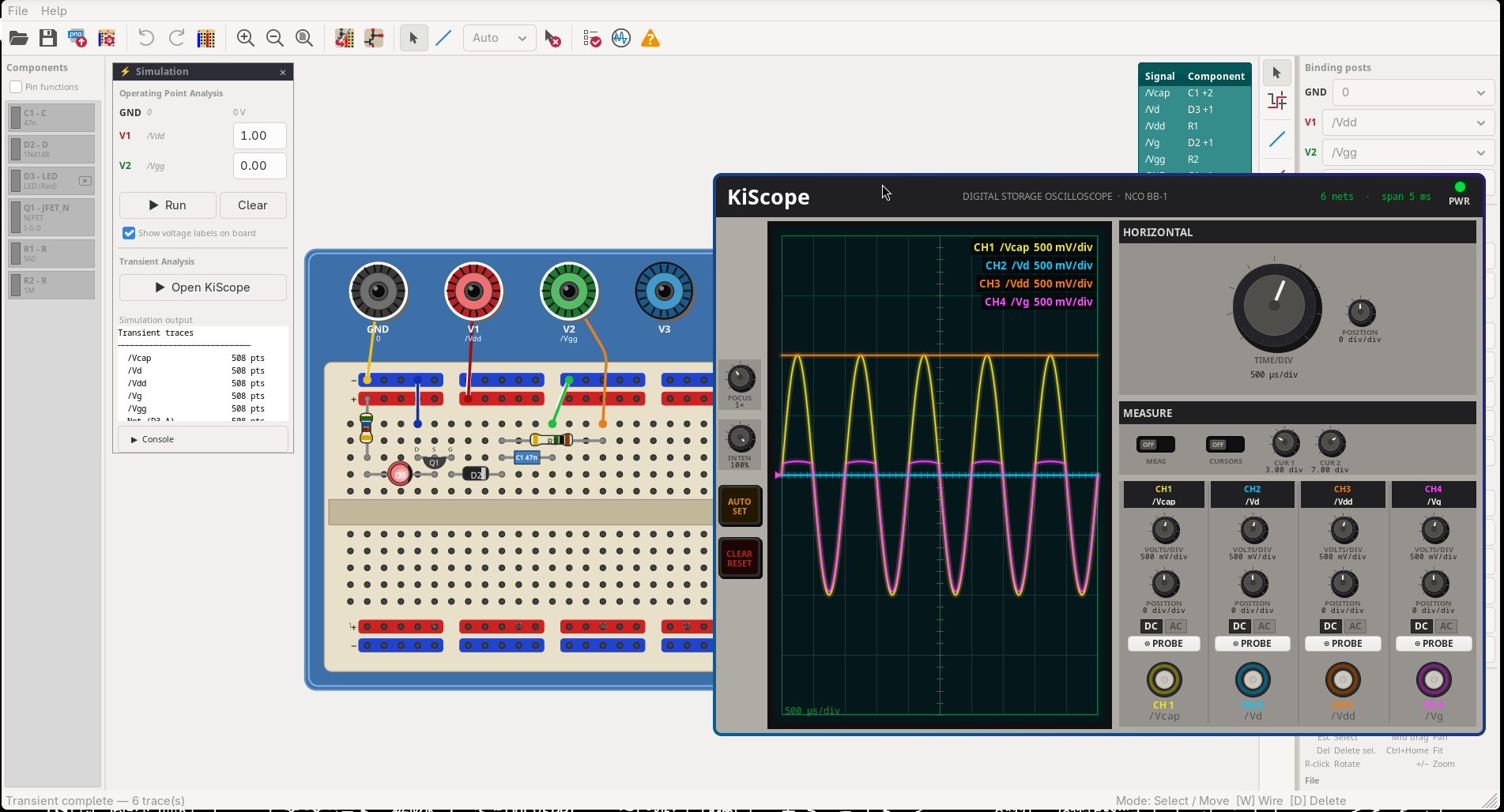

The validation logic is a pretty comprehensive netlist check that takes into account the symmetry of basic components such as resistors. They can be flipped around in real life, but not in the world of netlists (that was a PITA).

To make it even more beginner-friendly, I hooked it up to KiCad’s built-in ngspice, so you can have either:

  • Operating point simulation: see which DC voltages can be expected where
  • Transient simulation with an “oscilloscope” visual, with knobs you can turn and settings you can tweak. It also includes some basic measurements and cursors :)


Features:

  • Highlight nets: labelled nets can be highlighted from a list to help you find certain parts of your build
  • Color-coded resistors
  • Pin functionality: if KiCad’s symbol has a special function assigned to a pin, such as TRIG, OUT, etc., this can be shown instead of the pin number
  • Drawing, adding text, etc.
  • Instruments on the side that you can use to indicate where you would attach your power supply, with optional labels that also get checked against the netlist validation
  • Multiple breadboard layouts + customization options, so you can insert you own branding/logo should you want ;)
  • And more

It’s primarily meant for students to prepare their lab work, but it’s tinkerer-friendly!

I’m aware that similar tools exist, but over the years they have been absorbed into larger packages, no longer maintained, put behind paywalls, and so on. So I decided to make one that students can use freely, without too many barriers.

Enjoy!

Feedback is always welcome. I’m sure there are still bugs here and there, so feel free to report them :)

I plan to propose it as an official plug-in once I feel more confident that the majority of the bugs are gone :)
« Last Edit: May 12, 2026, 04:39:28 pm by Obin »
 
The following users thanked this post: johnboxall, edavid, larsdenmark, tooki, gamalot, ledtester, Jacon, golden_labels, bill_c, AdiUbarhande

Offline bill_c

  • Regular Contributor
  • *
  • Posts: 144
  • Country: us
Re: KiCad Breadboard Builder
« Reply #1 on: May 12, 2026, 11:35:10 pm »
Neat!
In the image, the red-blue bars along the edge of breadboard only connect 5 holes, if all the blue are electrically connected together then the blue should connect between the groups of holes, same for red. I didn't notice the white space on my new long breadboard 40 years ago and now its the first thing I see.
 

Offline ObinTopic starter

  • Regular Contributor
  • *
  • Posts: 137
  • Country: be
  • Hi
    • nacho.works
Re: KiCad Breadboard Builder
« Reply #2 on: May 13, 2026, 08:01:48 am »
Well, as i can show using the nifty Net Highlighter tool: On most breadboard the 'power rail' ties are grouped in groups of five, but are connected along half the length of the board, with a broader space in the middle where the electrical connection stops. I explicitly wanted to put this in the board as this is something I see first year students often forgetting during circuit assembly.

If, when using the tool, you find this level of realism impractical, this can be turned off in the preference menu, then the rail-ties are connected all along the length of the board  :D

Offline bill_c

  • Regular Contributor
  • *
  • Posts: 144
  • Country: us
Re: KiCad Breadboard Builder
« Reply #3 on: May 13, 2026, 12:26:40 pm »
This is what we usually see in real life, and just like any jumper wire or schematic wire, I think the color bars should show how they are connected (like in real life), the narrow space -wide  space doesn't match reality and is ambiguous at best.  I still think its a great addition for anyone learning electronics.
 
The following users thanked this post: Ian.M, Jacon

Offline ObinTopic starter

  • Regular Contributor
  • *
  • Posts: 137
  • Country: be
  • Hi
    • nacho.works
Re: KiCad Breadboard Builder
« Reply #4 on: May 15, 2026, 12:17:02 pm »
I understand what you mean now! Especially for you, I added it as an option :)
There are now four styles of power rail markings you can choose from. 'bbrd classic', 'bbrd modern', 'solid line', or 'no markings'

That should cover many scenario's! :)

Offline bill_c

  • Regular Contributor
  • *
  • Posts: 144
  • Country: us
Re: KiCad Breadboard Builder
« Reply #5 on: May 16, 2026, 02:20:27 pm »
That is much better :clap:.
 

Offline LouisB

  • Newbie
  • Posts: 6
  • Country: ca
Re: KiCad Breadboard Builder
« Reply #6 on: May 27, 2026, 02:42:21 am »
I love the scope, and it has that student favourite: AUTO SET !!!
At the risk of bikeshedding,I have never in my 20+ years of teaching electronics seen breadboards with the power rails in groups of five (unless it's something new in the last couple of years). If you want to make it more student friendly, show it in two groups with jumpers bridging the gap in the middle, that will remind them to jumper in real life..
Best
 --Louis
 

Offline ObinTopic starter

  • Regular Contributor
  • *
  • Posts: 137
  • Country: be
  • Hi
    • nacho.works
Re: KiCad Breadboard Builder
« Reply #7 on: July 23, 2026, 07:29:31 am »
V1.1.1 has been published to github yesterday and submitted to the KiCad gitlab. I suspect their repo will update in a short while as well for those who install using the kicad install tool.

  • There was an issue with v1.1.0 where a mismatch in the metadata would inhibit downloading using the KiCad tool itself, should be solved.
  • An issue where the net highlighting and error icons refuse to update is fixed.


Share me

Digg  Facebook  SlashDot  Delicious  Technorati  Twitter  Google  Yahoo
Smf


- - -
-->