Anyone have a high quality scan or original pdf of the Casio FX-61F Calculator manual and formula list? The best I've found online is from
manualslib.com and the attached formula list which leaves me a little cross eyed.
Update: Muttley has kindly done
the formula listUpdate: Daywalkerdha has kindly redone
the manualThe manual from Daywalkerdha is lower contrast so way less artifact noise from bleed through. Appreciate both your work on this.
If need be I could scan a copy of my formula list which is still in very good condition, the full manual would be difficult for me to scan as the book is rather small and tightly bound, otherwise hopefully somebody has a good PDF copy.
If need be I could scan a copy of my formula list which is still in very good condition, the full manual would be difficult for me to scan as the book is rather small and tightly bound, otherwise hopefully somebody has a good PDF copy.
Yeah it seems worth doing a decent scan for prosperity. It's 30 years old this year as well, an anniversary of sorts.
The oldest I could find is this one from 2005 similar to the one I linked in my OP. Lot of artifacts from page bleed through. Scanning an original with a lower contrast, a blanking page to prevent a little bleed through and modern processing to get a crisper black and white end image has got to to be better. If I had something decent to start with I'd give it a go myself.
https://web.archive.org/web/20051215223646/http://www.casiotechno.com:80/download/manual/FX-61F.pdf
Doing a scan on my flat bed would probably wreck the book which is currently in very good order and hardly touched since new, the other options would be to either clean up the linked copy you posted with something like MS Paint or simply write a replacement text copy in MS Word or similar.
The paint edit and clean up approach would maintain originality but could be rather time consuming particularly for the pedantic such as myself. The rewrite altogether approach should be reasonably straight forward for somebody familiar with the formula shortcut keys, these would be a big hurdle for me without a list or some assistance.
The paint edit and clean up approach would maintain originality but could be rather time consuming particularly for the pedantic such as myself. The rewrite altogether approach should be reasonably straight forward for somebody familiar with the formula shortcut keys, these would be a big hurdle for me without a list or some assistance.
Well I had a quick look and it's like polishing the proverbial turd, it really needs scanning again. Here is the Casio FX-10F manual which was probably also done in the 90s. So yeah some straight pages and a decent scan would go a long way.
https://www.manualslib.com/download/775048/Casio-Fx-10f.htmlOf course it would be nice to see it in color and all but unless you do that stuff day in day out recreating the whole manual sounds super time consuming.
If you have the formula list card handy, I reckon go for it. Perhaps try a black and white or grey scale scan and see how clean and straight you can get it. I'm not really the resident expert on scanning, probably that would be TerraHertz who has gone pretty deep on the subject.
Here are both sides of the formula card in its original form, I've had to scan it at 600 dpi to maintain reasonable clarity and anything lower than that starts to look rather ordinary as you can see from the third and forth images below. The card itself has a slight sheen and almost a semi-gloss finish which makes scanning a bit tricky, anyway I will play around a bit more and create a final card later on this afternoon.
I took a snapshot of the first page from that PDF posted above and then spent fifteen minutes cleaning it up with the paint eraser, certainly doable but a hell of a lot of work with no great benefit really. The image below is just for comparison and not completed by any means, I do find this sort of stuff somewhat therapeutic but something this involved and tedious is not for me at the moment in regards to the paint cleanup method.
Here are both sides of the formula card in its original form, I've had to scan it at 600 dpi to maintain reasonable clarity and anything lower than that starts to look rather ordinary as you can see from the third and forth images below. The card itself has a slight sheen and almost a semi-gloss finish which makes scanning a bit tricky, anyway I will play around a bit more and create a final card later on this afternoon.
Looks good. When you do your final scans see if you can get the border of the English table square. My old school method of checking for rotation and skew issues (without using a rotation tool) is in an editor make a net or square box around the text or table. Then you can manually compensate it by rotating and rescanning.
Still, that 600 DPI scan amazing compared to the other one.
Here are my final offerings in relation to the FX-61F Formula Card which accompanies the calculator, the images have been cleaned up considerably and there is room for further improvement if somebody has the desire. I have also included two additional versions for English and Spanish, the original card size was 128mm high and 140mm wide should anybody need to make a replacement.
Top job Muttley they look great

.
For anyone who is game to tackle scanning the manual let us know. I've done some in the past by opening the staples carefully and deconstructing it page by page. It's also easier then to use a blanking sheet of paper to stop bleed through while scanning.
Believe it or not my first ever job was as a bookbinder and unfortunately the FX-61F manual is glued so a proper scan would probably be destructive. I'm not sure how we can totally eliminate the bleeding from the reverse page without a lot of editing work as I touched upon back in reply #6, if you open each of those images in new tabs and switch between them you can see that the existing PDF does have potential for improvement. I was also thinking that perhaps we could send Casio an email to ask if they have something in their archives before trying to scan the book.
I'm not sure how we can totally eliminate the bleeding from the reverse page without a lot of editing work
Simple trick: put (pitch)black paper behind page you are scanning. Such black cover shall be accessory for every flatbed scanner.
I did a series of electronics courses at Tafe back in the late nineties and all of the students were compelled to purchase one of these calculators so that everyone was on the same page, I have no idea what they are using today, probably an Android app which I am guilty of myself.
Depending what course but at Universities they are still using the good old calculator, really just updated versions of what was being offered in the 80s with the same questionable design choices. They typically fall into non programmable, programmable, graphing and finance.
I just recently brought a Casio FX-100AU PLUS (non programmable Australian model) which was approved for statistics part of a course. The "Natural Textbook Display" runs about 5 lines deep and has easy input for algebra and statistics, not a bad calculator.
I prefer plastic over rubber buttons. I'm not a fan of silver plastic but being able to easily read the functions in general is a bonus. At the time of writing the Casio FX-100AU was the best thing going aside from the Classwiz series (which has a nicer display) but it was absent from some approved lists.
I had a look around on the Casio Support page earlier and they do have a number of manuals for older models but the FX-61F is unfortunately not listed, just out of curiosity I saved one manual for the FX-50F PLUS which I have posted below, there was a message which stated that if you cannot find something specific then to contact Casio Support in your region, this might be a valid option.
Casio Manuals English.https://support.casio.com/en/manual/manuallist.php?cid=004Casio Past Models Asia Region.https://www.casio-intl.com/asia/en/calc/pastmodels/
I wonder what would it take to manufacture made by Casio EEVblog calculator (maybe as crowdfunding project)? I would love to have such next to my fx-991es.
I wonder what would it take to manufacture made by Casio EEVblog calculator (maybe as crowdfunding project)? I would love to have such next to my fx-991es.
I believe Dave has previously approached Casio but got no reply.
is it an option to just snap photos of the book pages with a smartphone and post them raw somewhere for people who wants to take it from there.
is it an option to just snap photos of the book pages with a smartphone and post them raw somewhere for people who wants to take it from there.
There is a book/manual scanning method using a camera and a piece of flat non reflective glass to ensure the page lays flat. It gives great results if done properly and doesn't require the book to be pressed flat, so yes that is an option.
I wonder what would it take to manufacture made by Casio EEVblog calculator (maybe as crowdfunding project)? I would love to have such next to my fx-991es.
I believe Dave has previously approached Casio but got no reply.
Yep, no reply 
Try harder! Email their Japanese office in Japanese!
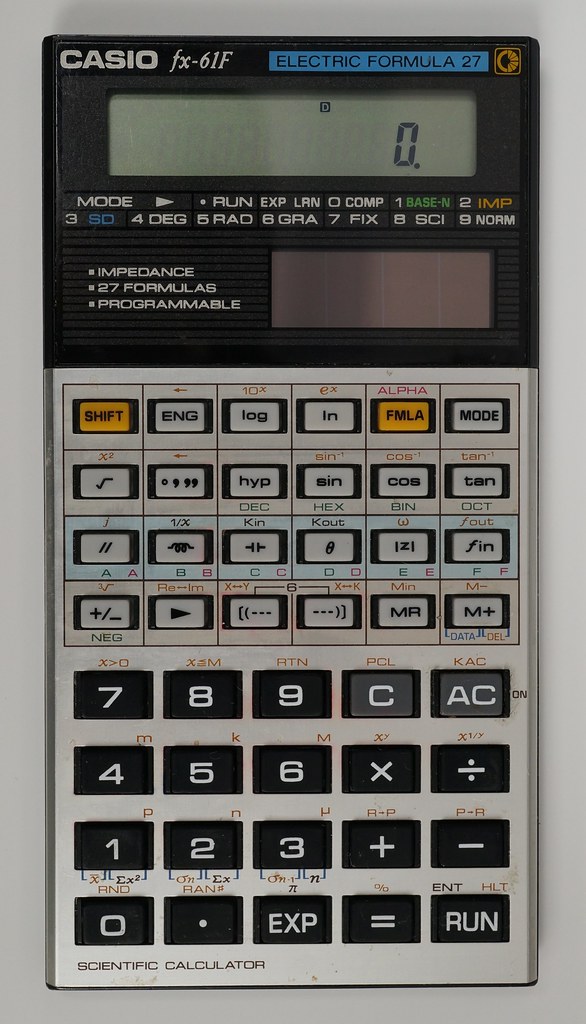 Casio FX-61F Scientific Calculator by Dave Jones, on Flickr
