-
I'll try Mint. I don't have masses of time to play with this and it will be a work in progress. For now I have windows. My idea was to dual boot and slowly move over.
-
I agree. This feels like yet another 'Simon can't get Linux to work on his computer' thread.
Really? kindly point out the other threads? I have not as you claim started a number of threads claiming linux does not work. But then you are well known as this forums biggest liar and your membership has for a while now hung on by a thread as you are nothing but a trouble maker! -
For AMD, support varies. Ubuntu LTS versions ought to have good support, but switching to a non-LTS version or a different distro is harder, as you may have to recompile the drivers yourself.
No, as an ordinary user you do not ever need compile the AMD drivers yourself. They're built into the kernel. The only exception I can think of are super-minimal distros like TomSrtBt (designed to fit on a 1.44MB floppy).
Generally speaking: AMD is magnitudes better on Linux than Nvidia, team red has not given me any first-boot issues in the last ~9 years whilst Nvidia is a lot more hit-and-miss.
For context: AMD dumped their proprietary drivers and starting working on the open-source ones several years back. As a result the open source ones have been really good quality for several years now and now mostly sit in-kernel (so you get them by default, no installation/setup required).
Source: ATI graphics user on Linux for many years, used to have to fight the previous proprietary drivers.
Sounds like I need an AMD graphics card then. I don't want to have to keep fixing drivers when there are updates. -
I'll try Mint. I don't have masses of time to play with this and it will be a work in progress. For now I have windows. My idea was to dual boot and slowly move over.
I'm using dual boot Windows 10 / Fedora 31 because I'm using a Zenbook and don't have an extra slot for another SSD/NMVE. But is a risk I'm willing to take. Windows is known for sometimes to mess around with the boot of the disks when installing new versions. Until now I've been safe but who knows. If I was able I would use separate physical drives.
In your case if you are using a Desktop and have the chance, install another SSD only with the distro you want and select the one you want to start up when you turn on the PC. That's the recommended way of doing it. And when Installing the distro check if you are creating the boot on the right disk, or if the Linux is going to write the bootloader on the disk with the Windows installed. The best is do deactivate the HDD/SSD directly on the BIOS or simply disconnect one of the cables.
Probably nowadays Linux knows that he should create the boot on the current HDD/SSD being used and I'm saying the most stupid thing in the world. If yes, then I'm sorry Linux users, I'm just trying to prevent further problems.
Then you can easily with both OSes change who boots by using ESC or F12 or whatever combination of keys your motherboard uses to access the available boot devices, or change the boot order on the BIOS.
And If you want give Fedora a try too. Normally I always see other distros being used. Rarely I see Fedora being recommended or people giving a try.Sounds like I need an AMD graphics card then. I don't want to have to keep fixing drivers when there are updates.
The equivalent of your Nvidia P400 in the AMD side is the Radeon Pro W4100
https://www.ebay.com/itm/Radeon-Pro-WX-4100-4GB-GDDR5-Graphic-Card-4-x-Mini-DP-TFC3M-100-Tested-Grade-A/274066517361?hash=item3fcfa32d71:g:NjoAAOSw-9tdYHuD
You may find some deals online from cards pulled from pre-build systems. -
I'll try Mint. I don't have masses of time to play with this and it will be a work in progress. For now I have windows. My idea was to dual boot and slowly move over.
First get a PC which has hardware which is supported by Linux (perhaps it is a good reason to get a new PC anyway) otherwise trying to get Linux installed is a waste of time (in the end all distributions use the same kernel and drivers with a slightly newer or older version). Until then use a virtual machine. Dual boot is the worst option because there will be a long delay to switch from one to the other. -
First get a PC which has hardware which is supported by Linux (perhaps it is a good reason to get a new PC anyway) otherwise trying to get Linux installed is a waste of time (in the end all distributions use the same kernel and drivers with a slightly newer or older version). Until then use a virtual machine. Dual boot is the worst option because there will be a long delay to switch from one to the other.
 Long Delay?
What long delay, restart and choose a different OS in the GRUB? I take 5 sec from boot after choose the OS on GRUB each time, being Windows or Fedora. Long time? Not more than 15 sec restarting, choose the OS and being at the Log In screen... -
15 seconds is a long time if all you want to do is check a something on screen (and you can't do it side by side when using dual boot). Not to mention needing to shutdown a whole bunch of applications. I usually have 20 or so windows open (datasheets, documents, programs). And how about copy & pasting text from one to the other? And let's not forget Windows update needing time to install before shutting down the computer. Dual boot just sucks. Use a virtual machine and it is instant and you basically have WIndows and Linux in one (near) seemless integration.First get a PC which has hardware which is supported by Linux (perhaps it is a good reason to get a new PC anyway) otherwise trying to get Linux installed is a waste of time (in the end all distributions use the same kernel and drivers with a slightly newer or older version). Until then use a virtual machine. Dual boot is the worst option because there will be a long delay to switch from one to the other.
Long Delay?
What long delay, restart and choose a different OS in the GRUB? I take 5 sec from boot after choose the OS on GRUB each time, being Windows or Fedora. Long time? Not more than 15 sec restarting, choose the OS and being at the Log In screen... -
What. The. Holy. Fuck.
Has anyone actually claimed VMs are horrible? I don't think that's the case.
Let's see if I have the picture right.
Simon is interested in switching from Windows to Linux, but finds out he has hardware that is not supported (or only supported by proprietary drivers) in Linux.
I suggested to try a specific live DVD/USB, to verify. I knew from previous experience with others that getting Linux to run on such hardware is possible, but is not a good experience for anyone who wants a better tool. So, I suggested to run Linux in a virtual machine, typical tasks, often enough to find out whether moving to Linux is suitable for him, by the time he is ready to buy his next workstation. If, at that point, he does intend to switch to Linux, it means choosing the hardware for Linux compatibility; instead of just looking at the advertisements and Windows benchmarks. The optimal hardware for different OSes is different.
This path is known to work. I've also used a secondary approach, giving someone an older machine that runs Linux well, to try out and see if they can find a well-working workflow on it. It has minimal risks, and maximum benefits, since Simon has not expressed any kind of strict deadlines for anything. Keeping him productive all through the testing and discovery phase just makes sense to me.
Instead, this thread devolved into "don't use virtual machines, they're horrible", "Linux can run anything, you're just doing it wrong", and other inanities. Those claims can be correct or incorrect in general terms, but for fucks sake, we're talking about Simon in particular here: an individual, not in generalities as to what is possible or how. (And possibly other individuals in a similar situation as Simon, since it is actually quite common.)
Those claims are just as silly as telling a beginner asking for help with their first switch-mode DC-DC converter circuit to forget it and buy an existing module instead; or to get some ferric chloride and etch the board like a man instead of using those Chinese spy-staffed PCB prototyping services that will steal your designs.
Yes, I personally do know how to get his hardware to work with Linux, but I am not going to suggest them to Simon, because it is too much effort versus the gains. In AvE's words, you suck too much for too long, before it gets better. It is hard enough to un-learn all the Windows-isms that especially power users get ingrained in their autonomic nervous system -- in my experience, the harder the more advanced the user is; impossible, after a certain point --, and to add hardware issues on top of that is just going to make a very unhappy, very unproductive user. And while I disagree with Simon on many things, I want him happy and productive.
What the fuck is so complicated or hard here? -
Has anyone actually claimed VMs are horrible? I don't think that's the case.
No, not exactly. Your advise started really well, then Cerebus and you started to get into the theoretical positives and negatives wrt. different types of hypervisors, when the only thing Simon (and others in his situation: interested in Linux, but having hardware with poor/no support in Linux) needs a hypervisor is to see if his workflow works in Linux.
The "horrible" part describes what those who do not know about virtualization take away from those comments.
Nobody said "Linux can run anything, you're just doing it wrong", either; nctnico got closest in his post, saying "This feels like yet another 'Simon can't get Linux to work on his computer' thread." and claiming that "all Linux distros fit that requirement" (referring to booting on most machines with hardware issues).
Whales doesn't seem to realize there are a lot of older AMD/ATI graphics card still in circulation, that are not supported by AMD, but only by the open source drivers. In fact, there is no "one" driver for AMD/ATI cards, but several. And their quality does vary by specific chipset. If a new Linux user just goes out and buys whatever AMD card they can find, there is a small chance it is one of the ones that aren't used by many Linux developers, and doesn't have support from AMD, in which case they're hosed. Just because Whales has hardware that works fine, does not mean one should be optimistic and assume all hardware from that vendor works fine also; that's just about never the case.
I also disagree about pointing completely new Linux users to Linux discussion forums and mailing lists, because I know most Linux old hands avoid those (exactly because they are directed to newbies), so they are basically newbies guiding other newbies. The solutions might work, but they are rarely the best solution for the problem. Learning how to ask specific questions -- in particular, not "How do I do X like I did in Windows?", but more like "I have Y, and I want to accomplish Z. What tools do you suggest?" --, show your own efforts beforehand, and form your questions and follow up with a summary, to show that you wish to contribute (because if you don't, why should anyone else bother to help you?), and show your solution (or failed attempts) to those that encounter a similar problem later on. It is communities, and the exchange medium is time and effort. While no money is exchanged, it definitely isn't a place to demand better service.
Instead, I recommend getting at least an initial feel for it, either live-booting or running a distro in a virtual machine, read tutorials and blog posts and maybe watch youtube videos to see what others do with Linux and suggest, and most importantly learning how to ask questions efficiently, before going on the forums. In particular, finding out how to gather the necessary logs, hardware summary, and so on, is pretty damn important. It is also a steep learning curve; you don't want to fight hardware issues at the same time, you just get frustrated, and add noise to the everything-is-better-than-Linux "discussion" on the net.
Look. I know from a couple of decades of intensive Linux use in a number of different areas, from art to programming, that it can be a more effective tool than Windows or Macs. It does not mean it always is, because it is completely up to the user. The difference is that Linux, per the Unix philosophy and the KISS principle, is designed to be molded to the users workflow, whereas commercial OSes do exactly the opposite: they provide a set of workflows the user can use. The skills, especially problem-solving skills, are completely different. I have helped others learn how to efficiently use Linux -- and funnily enough, that makes them independent of any OS, including Linux --, so I do damn well claim I know what I am talking about here.
The absolute hardest thing when moving to Linux from Windows is to wrap your mind around the changes; to unlearn the windows-isms that one has learned and intuitively believe/feel are natural and correct way for computers to work. That is easy for some, hard for others, and impossible for many advanced users: completely opposite to what "common sense" would say. Yet, that is exactly what I have observed in real life.
I could list you the reasons why I believe Simon is dangerously close to being one of that group of advanced Windows users. I don't care what OS Simon uses, but for some oddball reason, I do want him to be efficient and happy with his tools; so, I am careful in my suggestions. In fact, I want everyone to be efficient and happy. Call me crazy, eh?
It seems very controversial, but according to my sample of a few dozen new Linux users, it really is easier to learn how to use Linux for those who don't have much Windows experience, or have experience with more than one operating system. It is something to do with how humans learn tools. I know that I can show a bunch of kids, or even a bunch of old grandmas wanting to learn computers to have better contact to their grandchildren, how to use Linux to solve all sorts of problems quite efficiently, but that is because they don't have any preconceptions to overcome yet. (Analogs, parables, and composing stories to aid in understanding works really well, unless they think you are being condescending.) It is not an insult, nor intended as one, to point out that it is harder for long-term Windows users. It is what it is. -
Go through the other 'Linux versus Windows' threads and you'll see you have posted similar messages before which then resulted in similar lines of conversation: Tried to install Linux but failed and then start raving on about how well Windows works for you. Almost like just stirring sh*t up. If you want some serious help then at least quit the 'this works with Windows' statements. It is clear these come from frustration but it has been pointed out to you before that the first step for using Linux is getting a computer with hardware which is supported by Linux OR use a virtual machine on Windows. There is no use to try the same thing over and over while expecting a different outcome. Take a step back and come up with a different approach. And either way be prepared to put some time & effort into getting things like the user interface configured.I agree. This feels like yet another 'Simon can't get Linux to work on his computer' thread.
Really? kindly point out the other threads? I have not as you claim started a number of threads claiming linux does not work.
-
No, not exactly. Your advise started really well, then Cerebus and you started to get into the theoretical positives and negatives wrt. different types of hypervisors, when the only thing Simon (and others in his situation: interested in Linux, but having hardware with poor/no support in Linux) needs a hypervisor is to see if his workflow works in Linux.
The "horrible" part describes what those who do not know about virtualization take away from those comments.
Nobody said "Linux can run anything, you're just doing it wrong", either; nctnico got closest in his post, saying "This feels like yet another 'Simon can't get Linux to work on his computer' thread." and claiming that "all Linux distros fit that requirement" (referring to booting on most machines with hardware issues).
Whales doesn't seem to realize there are a lot of older AMD/ATI graphics card still in circulation, that are not supported by AMD, but only by the open source drivers. In fact, there is no "one" driver for AMD/ATI cards, but several. And their quality does vary by specific chipset. If a new Linux user just goes out and buys whatever AMD card they can find, there is a small chance it is one of the ones that aren't used by many Linux developers, and doesn't have support from AMD, in which case they're hosed. Just because Whales has hardware that works fine, does not mean one should be optimistic and assume all hardware from that vendor works fine also; that's just about never the case.
I also disagree about pointing completely new Linux users to Linux discussion forums and mailing lists, because I know most Linux old hands avoid those (exactly because they are directed to newbies), so they are basically newbies guiding other newbies. The solutions might work, but they are rarely the best solution for the problem. Learning how to ask specific questions -- in particular, not "How do I do X like I did in Windows?", but more like "I have Y, and I want to accomplish Z. What tools do you suggest?" --, show your own efforts beforehand, and form your questions and follow up with a summary, to show that you wish to contribute (because if you don't, why should anyone else bother to help you?), and show your solution (or failed attempts) to those that encounter a similar problem later on. It is communities, and the exchange medium is time and effort. While no money is exchanged, it definitely isn't a place to demand better service.
Instead, I recommend getting at least an initial feel for it, either live-booting or running a distro in a virtual machine, read tutorials and blog posts and maybe watch youtube videos to see what others do with Linux and suggest, and most importantly learning how to ask questions efficiently, before going on the forums. In particular, finding out how to gather the necessary logs, hardware summary, and so on, is pretty damn important. It is also a steep learning curve; you don't want to fight hardware issues at the same time, you just get frustrated, and add noise to the everything-is-better-than-Linux "discussion" on the net.
Look. I know from a couple of decades of intensive Linux use in a number of different areas, from art to programming, that it can be a more effective tool than Windows or Macs. It does not mean it always is, because it is completely up to the user. The difference is that Linux, per the Unix philosophy and the KISS principle, is designed to be molded to the users workflow, whereas commercial OSes do exactly the opposite: they provide a set of workflows the user can use. The skills, especially problem-solving skills, are completely different. I have helped others learn how to efficiently use Linux -- and funnily enough, that makes them independent of any OS, including Linux --, so I do damn well claim I know what I am talking about here.
The absolute hardest thing when moving to Linux from Windows is to wrap your mind around the changes; to unlearn the windows-isms that one has learned and intuitively believe/feel are natural and correct way for computers to work. That is easy for some, hard for others, and impossible for many advanced users: completely opposite to what "common sense" would say. Yet, that is exactly what I have observed in real life.
I could list you the reasons why I believe Simon is dangerously close to being one of that group of advanced Windows users. I don't care what OS Simon uses, but for some oddball reason, I do want him to be efficient and happy with his tools; so, I am careful in my suggestions. In fact, I want everyone to be efficient and happy. Call me crazy, eh?
It seems very controversial, but according to my sample of a few dozen new Linux users, it really is easier to learn how to use Linux for those who don't have much Windows experience, or have experience with more than one operating system. It is something to do with how humans learn tools. I know that I can show a bunch of kids, or even a bunch of old grandmas wanting to learn computers to have better contact to their grandchildren, how to use Linux to solve all sorts of problems quite efficiently, but that is because they don't have any preconceptions to overcome yet. (Analogs, parables, and composing stories to aid in understanding works really well, unless they think you are being condescending.) It is not an insult, nor intended as one, to point out that it is harder for long-term Windows users. It is what it is.
I never really said anything about hypervisor types either. Some hypervisors seem to support Linux to a better degree than others as they still need drivers to get things going. It seems fair to mention this when people are looking at the VM route. It may save them from a few nights of tinkering and a disappointment or two. -
But then again: what are the odds somebody is going to use some obscure (or antiquated) VM instead of a recent version of VMware or Virtualbox?
-
But then again: what are the odds somebody is going to use some obscure (or antiquated) VM instead of a recent version of VMware or Virtualbox?
By VM you mean hypervisor? I wouldn't call Hyper-V obscure or antiquated. It initially had a reputation for not being as good as VMWare's solutions but at this point a significant part of the market runs on Hyper-V one way or another. When used to run anything other than a Linux desktop replacement it's a pretty good hypervisor. -
No. I don't care what is under the hood. I just download & install a piece of software which does virtual machine for me. VMWare and Virtualbox seem to be the most used ones. Good enough for a desktop system. The difference in performance between a spinning hard drive and an SSD is huge though so I strongly recommend to run a virtual machine from an SSD.But then again: what are the odds somebody is going to use some obscure (or antiquated) VM instead of a recent version of VMware or Virtualbox?
By VM you mean hypervisor? I wouldn't call Hyper-V obscure or antiquated. It initially had a reputation for not being as good as VMWare's solutions but at this point a significant part of the market runs on Hyper-V one way or another. When used to run anything other than a Linux desktop replacement it's a pretty good hypervisor. -
No. I don't care what is under the hood. I just download & install a piece of software which does virtual machine for me. VMWare and Virtualbox seem to be the most used ones. Good enough for a desktop system. The difference in performance between a spinning hard drive and an SSD is huge though so I strongly recommend to run a virtual machine from an SSD.
The piece of software running a VM is called a hypervisor. This provides the virtual hardware and substitutes or abstracts actual hardware. The VM is the virtual machine you run on top of that. These are the OS and machine specific settings and arguably the virtual drives that make up a pretend computer. As the hypervisor substitutes the motherboard and other hardware you need drivers to get the OS going like you would on any other machine. Different hypervisors can have different levels of support for an OS. This is all a bit simplified but is essentially what Simon would be dealing with.
VMWare's solutions used to be the most used one but Hyper-V has been doing fairly well probably in no small part due to it being built into Windows. Microsoft also uses it for their cloud services.
https://en.m.wikipedia.org/wiki/Hypervisor
https://en.m.wikipedia.org/wiki/Virtual_machine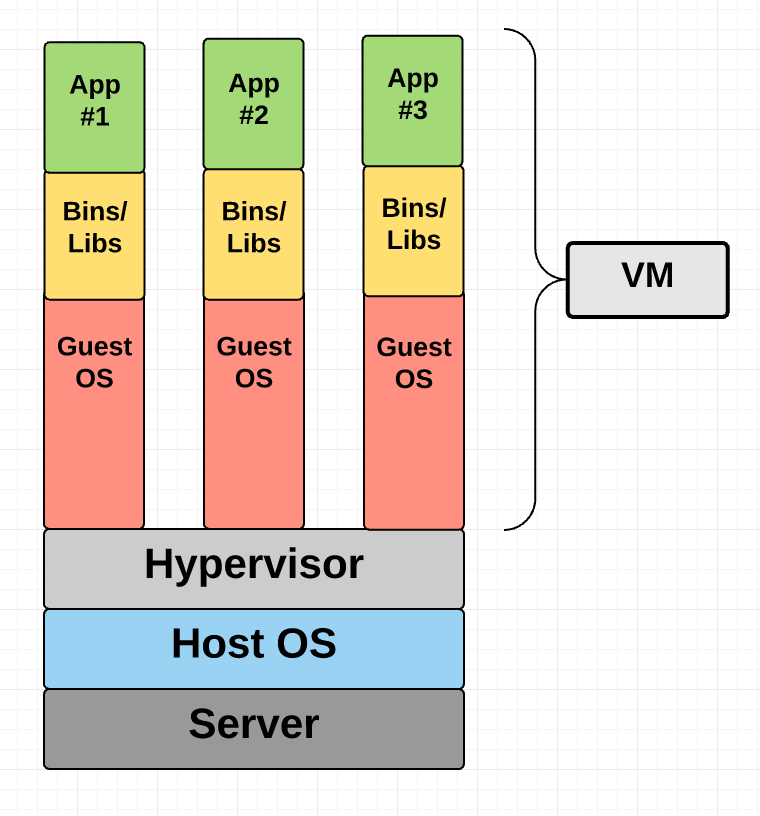
-
Now you make it sound like it is a problem. In reality virtual machine software packages just work out of the box if your CPU supports running a virtual machine. The only thing I ever had to tinker with on Virtualbox was switching between USB support to get a specific USB device going but that was 2 major versions and several years ago.No. I don't care what is under the hood. I just download & install a piece of software which does virtual machine for me. VMWare and Virtualbox seem to be the most used ones. Good enough for a desktop system. The difference in performance between a spinning hard drive and an SSD is huge though so I strongly recommend to run a virtual machine from an SSD.
The piece of software running a VM is called a hypervisor. This provides the virtual hardware and substitutes or abstracts actual hardware. The VM is the virtual machine you run on top of that. These are the OS and machine specific settings and arguably the virtual drives that make up a pretend computer. As the hypervisor substitutes the motherboard and other hardware you need drivers to get the OS going like you would on any other machine. Different hypervisors can have different levels of support for an OS. This is all a bit simplified but is essentially what Simon would be dealing with. -
Now you make it sound like it is a problem. In reality virtual machine software packages just work out of the box if your CPU supports running a virtual machine. The only thing I ever had to tinker with on Virtualbox was switching between USB support to get a specific USB device going but that was 2 major versions and several years ago.
I'm mostly just providing correct terminology as that seems to have some people confused. Linux doesn't seem to be supported equally well by all hypervisors like it isn't by all motherboards so mentioning this may save Simon some frustration when going down the VM path. -
several linux distros have failed to work. Widows works with my hardware. What do you want me to say? the industry works on standards. There is a minimum standard that all hardware should work to, not the best performing but a common ground that lets any OS run any hardware in a basic mode.
Did you even TRY starting it up in a pure-VESA mode or anything?
Unless you have really strange hardware, you almost certainly can get it booted if you actually try. You may well have terrible, useless graphics performance until you manage to find a working driver that is better than VESA/BIOS or raw frame buffer, but you almost assuredly can at least boot and install the OS!QuoteOnce you get in you install the actual driver. I have NEVER had windows fail to use a graphics card to a minimumm standard that allows me to get going
Really? You must not get out much.
That happens all the time on Windows, which is why you can do things like manually override via F8 to "VGA" mode, which can still fail sometimes too, though you've apparently never seen it.
If you actually try booting some of your Linux flavors or FreeBSD or something with a generic driver, just like you say you would do with your beloved Windows, it will almost certainly run....
I think you're just annoyed that you have to do essentially the same as hitting F8 -> VGA Mode instead of it just somehow automagically working on your particular hardware.
If you get annoyed that easily with unfamiliar annoyances, then you probably should just stick with Windows and those annoyances to which you've become accustomed instead of trying to move to something else that, while it may annoy at times, at least gives you the flexibility, tools and opportunity to make it actually work the way you want, if you actually want to bother... YMMV. -
Whales doesn't seem to realize there are a lot of older AMD/ATI graphics card still in circulation, that are not supported by AMD, but only by the open source drivers. In fact, there is no "one" driver for AMD/ATI cards, but several. And their quality does vary by specific chipset.
True enough, although most work very well, especially older, more well tested platforms....QuoteIf a new Linux user just goes out and buys whatever AMD card they can find, there is a small chance it is one of the ones that aren't used by many Linux developers, and doesn't have support from AMD, in which case they're hosed.
Really? Like what chipset?
Other than the Radeon HD 3870 and Mobility Radeon HD 5000 with their known quirks making them virtually impossible to support, the OS I know best (FreeBSD) supports all the way to VEGA, including the internal GPUs on things like the Ryzen 2 5400G.... and the graphics support on FreeBSD is derived from the Linux GPU support projects... so if even after some porting delay FreeBSD supports this list, I assume Linux probably does also:
https://wiki.freebsd.org/Graphics/AMD-GPU-Matrix -
QuoteQuote
If a new Linux user just goes out and buys whatever AMD card they can find, there is a small chance it is one of the ones that aren't used by many Linux developers, and doesn't have support from AMD, in which case they're hosed.
Really? Like what chipset?
Last time I checked Radeon RX VEGA M was not supported. I got caught out with this one. So I think the advise is good to check first and make sure the distro you will be using does support the hardware before you purchase the hardware.
I don't however see this as a negative towards Linux, it's more a negative against the vendor, if I want a Linux box I'm not going to buy their hardware if it's not supported. -
I abandoned Windows gradually, in the course of one year or more back in the day (20 years ago). But I was resolute.
Linux was (and still is) my prime OS, and Windows only in case of extreme necessity. -
I'll try Mint. I don't have masses of time to play with this and it will be a work in progress. For now I have windows. My idea was to dual boot and slowly move over.
First get a PC which has hardware which is supported by Linux (perhaps it is a good reason to get a new PC anyway) otherwise trying to get Linux installed is a waste of time (in the end all distributions use the same kernel and drivers with a slightly newer or older version). Until then use a virtual machine. Dual boot is the worst option because there will be a long delay to switch from one to the other.
I know some of you will cringe, but I wonder if Simon should consider a machine with Linux pre-installed from a company such as https://system76.com/
Yeah, I know the laptop hardware isn't like a ThinkPad but the hardware -is- Linux compatible with email support.
-
i hoped Linux will be one day happening but i've been dreaming 20+ years now. if nobody can deal with graphics card correctly in Linux, on which millions of gamers (big market) out there are hoping for, then forget about niche or professional market. we are talking about thousands or millions of peripherals out there.. printers, cameras, scanners, stylus/pen/tablets, anything! not just GPU for playing games. if a pro have to select tools based on what an OS can support, then they deserve oblivion. Ms provides "Standard" to vendors to follow, a Standard that wont change in a few days or weeks, even Ms staffs the insiders have to follow this Standard very closely on newer OS, and in inevitable case they cant, they will provide backward or forward compatibilitiness, this is the reason why millions of peripherals work in Windows, this is why peripherals from 10-20 years ago still work in newer Windows7 or 10, "a worthy investment". how can you make a Standard on 1001 flavors of OS? each one with their own self ego intention?
i heard someone said Linux doesnt support cheap crap devices, i have here $4000 printer, searching google on how to make it work in Linux is NIL, Zilch. let alone many others consumers grade tools and one specialized tool i have here. if you work with many hardwares, just forget it. afaik Linux is only good for internet, some type of programming environments and playing crippled grade 3D games meant for ARM processors. but i will never cease to dream, i will keep the hope open, untill LinuxES can become vendors/hardwares/pro SWs friendly. i read Steam/Origin server give much hope on Linux as gaming platform, but how specifically they do that i dont know if GPU cards alone (esp NVIDIA) cant be solved correctly.
-
I know some of you will cringe, but I wonder if Simon should consider a machine with Linux pre-installed from a company such as https://system76.com/
Yeah, I know the laptop hardware isn't like a ThinkPad but the hardware -is- Linux compatible with email support.
Why should we cringe ?
I cringe when I walk into a big retail store lined with Windows machines, and NOT ONE SINGLE LINUX machine.
That's cringe worthy. Retail stores should be full of all kinds of choices of PC's, including preinstalled Linux just the same as preinstalled Windows. A linux PC would work from the boot up when it was taken home, just like Windows. Of course the Linux PC software would be free, unlike Windows, and $100 cheaper.
Before anyone claims "Windows is the only available choice because Windows is best", let's look at actual recorded American law instead of Windows fanboy fantasies ?
Note the reference to "Linux" below ?
The Sherman Antitrust Act of 1890 is a United States antitrust law that regulates competition among enterprises, which was passed by Congress under the presidency of Benjamin Harrison.
Judge Thomas Penfield Jackson issued his findings of fact on November 5, 1999, which stated that Microsoft's dominance of the x86-based personal computer operating systems market constituted a monopoly, and that Microsoft had taken actions to crush threats to that monopoly, including Apple, Java, Netscape, Lotus Software, RealNetworks, Linux, and others.
United States v. Microsoft Corporation, 253 F.3d 34 (D.C. Cir. 2001),[1] was a noted American antitrust law case in which the U.S. government accused Microsoft of illegally maintaining its monopoly position in the PC market primarily through the legal and technical restrictions it put on the abilities of PC manufacturers (OEMs) and users to uninstall Internet Explorer and use other programs such as Netscape and Java. At trial, the district court ruled that Microsoft's actions constituted unlawful monopolization under Section 2 of the Sherman Antitrust Act of 1890, and the U.S. Court of Appeals for the D.C. Circuit affirmed most of the district court's judgments.
Until you CAN walk into a retail store and choose between Linux, Windows and anything else, you can be sure that Microsoft HAS NOT CHANGED, that they are still monopolists who got where they are today by limiting your CHOICE illegally.
One more thing, the Linux machine on the same hardware as a Windows one must be at least $100 cheaper ... no Microsoft tax!
-
Until you CAN walk into a retail store and choose between Linux, Windows and anything else, you can be sure that Microsoft HAS NOT CHANGED, that they are still monopolists who got where they are today by limiting your CHOICE illegally.
One more thing, the Linux machine on the same hardware as a Windows one must be at least $100 cheaper ... no Microsoft tax!
Microsoft to us outsider views obviously not changed at all.
But ... pstt ... for sure the flow of candies for maintaining this even after the court verdict, is not cheap to those the "authorities".
So there goes your tax.