-
STM32 32F417 Cube IDE 1.14.1 GCC C v11
char buffer[1000];
buffer[0]=0;
Now buffer contains a 0x00 and then random data.
strcat(buffer, "\r\n");
this writes just the two chars to buffer, not a \0 as well
strcat(buffer, "\r\n\0");
this does it correctly
but
strcat(buffer, "test-string");
does write the test-string and a \0 which is correct.
What is the difference?
\r\n are control characters... Googling suggests that the resulting string is null terminated only if the strings are "string literals" and \r\n isn't.
-
https://en.cppreference.com/w/c/language/string_literal
Escape codes are treated as characters just like any other. The string "\r\n\0" is the array (char) {0x0d, 0x0a, 0, 0}.
The confusion (or bug) lies in strcat(), or the declaration of buffer. Check the section buffer is placed in: it's most likely .bss which is zeroed on startup. You might miss the added zero due to the existing zero padding.
If it's in .noinit (or a platform-specific equivalent), or not a global but local in a function or other scope (an automatic variable), it may contain data from prior execution, old stack contents, etc.; in short, the value is undefined.
Tim -
The buffer is local to a function, so on a stack.
I have now sorted this specific issue by filling it with zeroes, but I suspect something else is going on...
-
Yes, we'll need to know what exactly you are observing here and in which context. It's 100% unlikely that the effect after the strcat call gets you a string with a non-zero value at index 2. But the optimizer is free to do whatever it likes to get you to that result - keep in mind that most "string" calls (str functions, memcpy, memset, etc) in GCC are inlined when the size is small enough and known in advance. If the compiler knows that the array contains a zero at initialization at index 2, then it could happily only copy the 2 characters. So, what did you observe here?
Is the 3rd byte (index 2), in your first test: "strcat(buffer, "\r\n");" non-zero? That would indeed be a severe bug.
But if the issue is that the code does explicitely writes only the first two bytes and the third is already zero, then it's "normal" behavior for an optimizing compiler.
So, we'll need to know a bit more. -
The C standards (C23: 7.26.3.1, C17: 7.24.3.1, C11: 7.24.3.1, C99: 7.21.3.1) define strcat(s1, s2) thus:Quote
The strcat function appends a copy of the string pointed to by s2 (including the terminating null character) to the end of the string pointed to by s1. The initial character of s2 overwrites the null character at the end of s1. If copying takes place between objects that overlap, the behavior is undefined.
Thus, it would be a bug in the strcat() implementation to behave differently for strcat(buffer,"\r\n") and strcat(buffer,"\r\n\0"). In C, a string is a character array terminated by the null character \0, and if you examine past that, the parameter is no longer a string (it'd be a character array, or otherwise described as not being an ordinary string in the function definition).
The only way I can imagine getting the results you have described if strcat() is defined as a macro along the lines of
#define strcat(s1, s2) memcpy(s1 + strlen(s1), s2, (sizeof s2) - 1)
which is obviously an error, as the terminating null character is not copied. It can be (and often is) implemented asCode: [Select]char *strcat(char *restrict s1, const char *restrict s2) {although personally I'd prefer to use strncat() instead and include some checks (especially when the concatenated string does not completely fit in s1, as standard strncat() does not include the terminating null characrer in that case). In general, I prefer the BSD strlcat() semantics:
memcpy(s1 + strlen(s1), s2, strlen(s2) + 1);
return s1;
}Code: [Select]char *strlcat(char *s1, const char *s2, const size_t size) {
const size_t n1 = strnlen(s1, size);
const size_t n2 = strnlen(s2, size);
if (n1 >= size) {
s1[size - 1] = '\0';
} else
if (n1 + n2 > size) {
memcpy(s1 + n1, s2, size - n1 - 1);
s1[size - 1] = '\0';
} else
if (n2 > 0) {
memcpy(s1 + n1, s2, n2);
s1[n1 + n2] = '\0';
}
return s1;
} -
STM32 32F417 Cube IDE 1.14.1 GCC C v11
char buffer[1000];
buffer[0]=0;
Now buffer contains a 0x00 and then random data.
strcat(buffer, "\r\n");
this writes just the two chars to buffer, not a \0 as well
strcat(buffer, "\r\n\0");
this does it correctly
Try the following:Code: [Select]char buffer[] = "abcdefghijklmnopqrstuvwxyz";
buffer[0] = 0;
strcat(buffer, "\r\n");
What are the contents of buffer after this? -
Quote
But if the issue is that the code does explicitely writes only the first two bytes and the third is already zero, then it's "normal" behavior for an optimizing compiler.
I agree but then I would have never spotted it
No; doing strcat \r\n put in just the \r\n (2 bytes) and the next byte was as it was before (\07 in this case).
IanB - I will try that tomorrow, in isolation. Going to bed now Spent all day chasing weird issues.
The optimisation is -Og i.e. nowhere near the highest. -
You are better off using snprintf instead of strcat because snprintf results in a valid string which does not exceed the provided buffer length by definition. I never use strcat (or strncat) because it can result in an unterminated string (or buffer overflow) which can lead to all sorts of bugs.
-
Quote
But if the issue is that the code does explicitely writes only the first two bytes and the third is already zero, then it's "normal" behavior for an optimizing compiler.
I agree but then I would have never spotted it
No; doing strcat \r\n put in just the \r\n (2 bytes) and the next byte was as it was before (\07 in this case).
IanB - I will try that tomorrow, in isolation. Going to bed now Spent all day chasing weird issues.
The optimisation is -Og i.e. nowhere near the highest.
So I suppose you ran into a bug and tracked it down to this using the debugger.
Initializing the buffer with known values, as IanB showed you, is a good start. It will help you see if any part of the buffer gets overwritten - it may come from another part of the code altogether. Since it's on the stack, it may get corrupted by something else, or, if you're sure it isn't, last resort is that you may be at the very bottom of the stack - so, a stack "overflow" - in this particular function. -
strcat(buffer, "\r\n");
this writes just the two chars to buffer, not a \0 as well
99.999% you are mistaken. 0.001% you have a buggy compiler and/or libc.
Please show the generated code.
Certainly it looks fine here ...
https://godbolt.org/z/WW1TeehMM
... as you would expect.
Stupid to inline the strcat(), and still do a strlen() call instead, but whatever.
You can clearly see that it copies the '\r\n' with ldrh/strh, then the null with ldrb/strbCode: [Select].LC0:
.ascii "\015\012\000"
foo:
push {lr}
sub sp, sp, #1004
movs r3, #0
strb r3, [sp]
mov r0, sp
bl strlen
add r2, sp, r0
movw r3, #:lower16:.LC0
movt r3, #:upper16:.LC0
ldrh r1, [r3] @ unaligned
ldrb r3, [r3, #2] @ zero_extendqisi2
strh r1, [sp, r0] @ unaligned
strb r3, [r2, #2]
ldrb r0, [sp, #2] @ zero_extendqisi2
add sp, sp, #1004
ldr pc, [sp], #4
Interesting that for RISC-V gcc 11 (and current trunk too) dispense with the string constant entirely and just load the 13 and 10 as constants, and use the zero register for the trailing null:Code: [Select]li a5,13
sb a5,0(a0)
li a5,10
sb a5,1(a0)
sb zero,2(a0)
Regardless, both Arm and RISC-V are correctly storing the trailing null.
-
Quote
You are better off using snprintf instead of strcat because snprintf results in a valid string which does not exceed the provided buffer length by definition. I never use strcat (or strncat) because it can result in an unterminated string (or buffer overflow) which can lead to all sorts of bugs.
According to above, strcat should always append a \0 so if adding e.g. "\r\n" to a buffer, it should reliably search that buffer until it finds a \0 and then replace that \0 with \r\n\0.
I am continuing the work and now \r\n is adding the \0 correctly. It's a complete mystery. I just filled the whole buffer with zeroes first. But when I filled it with 'A' it also worked. So it is something else.
EDIT:
Working one step at a time from a working version, I found that replacing
char appnamestring [] = "appname_1.1";
with
char appnamestring [] = {"appname_1.1\0"};
makes it work. The 2nd one is a more explicit initialisation. The context is:Code: [Select]
// Function returns a pointer to the customer application string.

#include "appname.ini"

char * get_appname(void)
{
	return (appnamestring);
}
and appname.ini contains
char appnamestring [] = {"appname_1.1\0"};
The string is outside a function so should end up as initialised data which gets copied to RAM at startup. It should probably be "const". But that blows it up.
Funny thing is that I have another (rare) case of Cube IDE SWD interface getting buggered-up by C code in the project! -
Quote
You are better off using snprintf instead of strcat because snprintf results in a valid string which does not exceed the provided buffer length by definition. I never use strcat (or strncat) because it can result in an unterminated string (or buffer overflow) which can lead to all sorts of bugs.
I don't agree with the above advice because you can get the length argument to snprintf wrong just as easily as you can misallocate the space in the buffer.QuoteAccording to above, strcat should always append a \0 so if adding e.g. "\r\n" to a buffer, it should reliably search that buffer until it finds a \0 and then replace that \0 with \r\n\0.
It absolutely should. It is almost inconceivable that you have a compiler/library that doesn't work. The 99.9999% possibility is that you're doing something wrong afterwards.QuoteWorking one step at a time from a working version, I found that replacing
char appnamestring [] = "appname_1.1";
with
char appnamestring [] = {"appname_1.1\0"};
makes it work. The 2nd one is a more explicit initialisation. The context is:
That makes no sense whatsoever Neither the braces not the \0.
-
Hard to believe such bug exist.
From your initial minimum example reproducing the problem:Code: [Select]char buffer[1000];
buffer[0]=0;
strcat(buffer, "\r\n");
Please try this:Code: [Select]char buffer[1000];
buffer[0]=0;
strcat(buffer, "\r\n");
for(int i=0; i<3; i++)
printf("%02x ", buffer[i]);
printf("\n");
and post the result. -
Working one step at a time from a working version, I found that replacing
Aha! I wager you are trying to append to an object in initialized data, without reserving enough room for the modified version.
char appnamestring [] = "appname_1.1";
with
char appnamestring [] = {"appname_1.1\0"};
makes it work.
If you are effectively doing strcat(appnamestring, "\r\n"); (say via char *p = get_appname(); strcat(p, "\r\n");), you are overwriting initialized data following the appnamestring object!
If you have
const char appnamestring [] = "appname_1.1";
then the object is stored in Flash, and if you do
char *p = get_appname(); strcat(p, "\r\n");
you are effectively trying to modify Flash memory contents, which will obviously fail.
In practice, you should instead create a copy of the string, reserving enough memory for the modified string, and use that:Code: [Select]void foo() {Here, the temporary copy is on stack. The #if 1 ... #else ... #endif shows the two ways to create the copy and append the CR-LF newline, but since it is just two fixed characters, I recommend using the first.
const char *name = get_appname();
const size_t namelen = (name) ? strlen(name) : 0;
// Temporary copy on stack
char modified[namelen + 2 + 1]; // +2 for "\r\n", +1 for final "\0"
#if 1
if (namelen > 0)
memcpy(modified, name, namelen);
modified[namelen + 0] = '\r';
modified[namelen + 1] = '\n';
modified[namelen + 2] = '\0';
#else
modified[0] = '\0';
if (namelen > 0)
strcat(modified, name);
strcat(modified, "\r\n");
#endif
//
// Do something with the 'modified' string
//
// Since 'modified' was on stack, it will not exist after we return from this function
}
(The alternate method is to use a preprocessor macro containing the application name as a string, and reserve enough space for a suffix:
#define APPNAME "appname_1.1"
char appnamestring[sizeof (APPNAME) + 4] = APPNAME;
which initializes the array to the expected value, including a trailing null character (via sizeof string-literal), plus reserves space for four more characters. That is, you can do strcat(appnamestring, "abcd"); safely exactly once. Because this permanently changes the application name, I do not recommend doing this.) -
There is certainly something weird going on. I will investigate whether there is a stack space issue in the RTOS tasks. This was already carefully checked but...
No; those strings are used read-only.
Stepping through the \r\n strcat code it does actually work IF certain other things are not happening elsewhere. It almost looks like an alignment issue but the 32F417 handles unaligned objects. And looking at the .map file, the linker is aligning them anyway.
I can recreate the problem reliably just by removing those curly brackets and the \0. I checked in the .map file that the stored string (in RAM) is the same although, as expected, the \0 adds an extra \0 to the end of each one.
So, it's gonna be a fun day today
Thank you all for your tips. -
No; those strings are used read-only.
Then, mind explaining how get_appname()/appnamestring[] modification affects your strcat() operation? That is, exactly how buffer[], get_appname(), and appnamestring[] are used; the entire chain, not just snippets and assumed "sufficiently similar code". -
And, important question, are you actually having a problem, i.e. C code seeing wrong results (lack of terminating zero), or are you just seeing a problem in a debugger?
Remember, debuggers are very nasty and require nearly wizard level understanding of everything, otherwise they sometimes produce false positives i.e. make you think you have a problem when you do not. -
Yes, these small changes break a lot of stuff. Some, like removing the curly brackets, produces a working box but ETH and USB are dead. I got to the strcat checking when I started working through the code from the start.
It's really complicated because the RTOS needs to be running for any meaningful functionality.
Nominal Animal - if I knew the answer then I would have a fix
-
I can recreate the problem reliably just by removing those curly brackets and the \0. I checked in the .map file that the stored string (in RAM) is the same although, as expected, the \0 adds an extra \0 to the end of each one.
The braces have certainly got zero do do with it, as they will never affect the generated code in any way.
What is your evidence that you even have a problem?
Please present a COMPLETE code example that fails, sufficient for us to duplicate the problem.
-
No. Sizeof() will give you the correct length for the buffer you provide to snprintf. It is bullet-proof. On top of that, modern GCC compilers will throw a warning if you potentially can put more text into a buffer than will fit.QuoteYou are better off using snprintf instead of strcat because snprintf results in a valid string which does not exceed the provided buffer length by definition. I never use strcat (or strncat) because it can result in an unterminated string (or buffer overflow) which can lead to all sorts of bugs.
I don't agree with the above advice because you can get the length argument to snprintf wrong just as easily as you can misallocate the space in the buffer. -
Nominal Animal - if I knew the answer then I would have a fix
Having a Minimal, Complete, Verifiable Example of the problem is the next step.
We already know that current compilers generate correct code (and do not replicate the behaviour you have described), and it is unlikely your strcat() implementation is buggy (although we could check if we knew the exact version of your compiler and base C library, almost certainly newlib). Thus, the most likely cause of the bug is an interaction.
Most likely such an interaction causing the bug is an overflow, i.e. something overflows causing interaction between values of different variables.
Just because you allocate an array of 1000 bytes on stack on a microcontroller, it does not mean there was that much room available on the stack; it could overflow into other data sections, and cause all sorts of odd issues. I recommend that after allocating buffer[] on stack, you check the value of (intptr_t)((char *)pxStack - buffer) to see how many bytes of stack are used at that point. (Outside of FreeRTOS tasks, one could check (intptr_t)((char *)&_estack - buffer), _estack being a symbol whose address is the initial stack pointer, assuming stack grows towards smaller addresses.) -
Sizeof() will give you the correct length for the buffer you provide to snprintf. It is bullet-proof.
Only when the destination buffer is an array whose size is known in the current scope. For example,
char buffer[1000];
int n = snprintf(buffer, sizeof buffer, "%s\r\n", get_appname());
if (n >= 0 && (size_t)n < sizeof buffer) {
// You have valid contents in buffer
}
When the destination buffer is a pointer, this no longer works.
When such a buffer is passed as a parameter to a function, the function should take the size of the character array as a parameter first, then the character array or a pointer to the first character in the character array, i.e.
returntype functionname(size_t size, char buffer[size]) {
noting that an array function parameter will always decay to a pointer to its first element.
If the function is passed a pointer to the buffer and the size of said buffer, say
returntype functionname(char *buffer, size_t size) {
then the snprintf() expression must use the size and not sizeof, i.e.
int n = snprintf(buffer, size, "%s\r\n", get_appname());
I've seen enough code failing here, especially one-off errors like assuming n == (int)sizeof buffer or n == (int)size indicating valid results (it actually indicates truncation, last non-null character being omitted from the result, although buffer will contain a proper string with a terminating null character), that I wouldn't call it bullet-proof. -
No. Sizeof() will give you the correct length for the buffer you provide to snprintf. It is bullet-proof. On top of that, modern GCC compilers will throw a warning if you potentially can put more text into a buffer than will fit.
It's not. And that that doesn't work when you're writing string data you're being passed.
https://godbolt.org/z/9xb7Yj7Ko
OK, there's a warning there. You might write 7+ bytes in a 5 byte buffer.
Now change the buffer size from 5 to 10 (or even 7). The warning goes away.
Now pass "I'm a very jolly message" as the function argument. BOOM.
Programming is hard. Think carefully.
-
Safestring is the best way
-
This is a piece of a 256 byte buffer
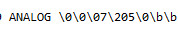
and after doing
strcat(buffer, "\r\n");
I get this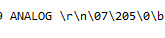
which has \07 instead of \0.
Now, unsurprisingly if I prefill the buffer with 0s then the \07 is not there anymore.
But even the prefill does not make the general bombing problem go away. So I think my best bet is to try to trace down why strcat is failing to append the \0 (an earlier one in the same function is not failing).
The .map file shows strcat at 805892c
and this is it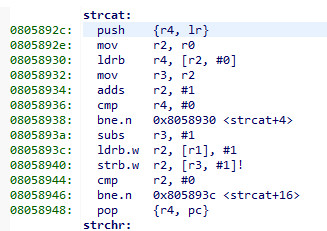
but that is not the code which gets run when strcat gets called above!
On a breakpoint on the strcat line I end up here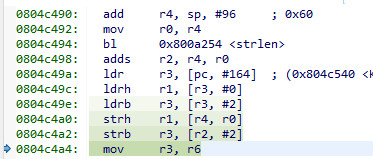
which calls strlen and then does some weird stuff I can't work out. Maybe they decided that the \r\n can fit into a register so they are not doing any string copy? Maybe not though because if I make that add-on string much longer
strcat(buffer, "\r\n\0\0\0\0\0");
the disassembly looks the same.
Maybe strcat is being inlined here? Must be.