I've been on this for 2 days, googled in the usual places, but nothing works. Lots of people asking the same Q. The scheduled program starts allright but is invisible.
I did an almost identical job with win7-64 and did not have any problem. Same with winXP.
I have a win11 host running VMWARE player v16, and (this is probably irrelevant) the VM is Debian 13.
The player starts (silently) and you can see it in the task manager, under Background Processes
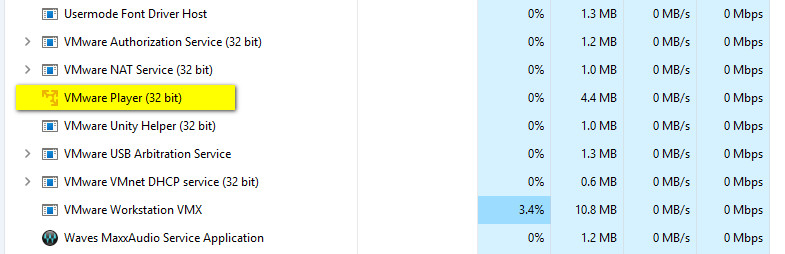
but I cannot access it. It is set to run in the same username as I am logged into interactively (and is verified in Task Manager; username is Peter)
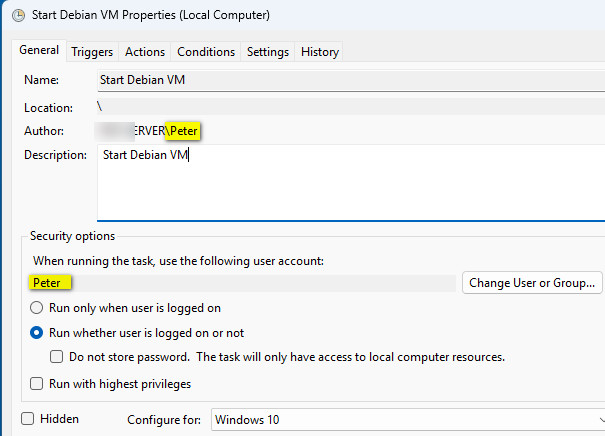
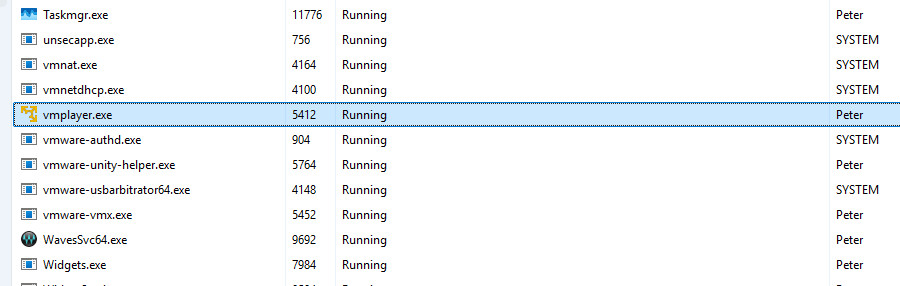
What I don't get is how you can have an interactive login as Peter and have an invisible program running also under Peter. Normally to achieve this, the program to be invisible is to run as a Service, but I am not doing that. When I do log in, say some hours after startup, there seems to be no way to "retrieve" that invisible program (in this case the VMWARE player).
The process actually scheduled is a .bat file containing this:
echo %USERNAME% %date% %time% starting VM >> c:\temp\vmstart.log
"C:\Program Files (x86)\VMware\VMware Player\vmplayer.exe" "C:\VM-Debian-13\Debian 13.vmx"
but I tried directly scheduling vmplayer.exe too; no difference. The log file shows the right stuff as expected:
Peter 12/11/2025 11:08:01.66 starting VM
Peter 12/11/2025 11:22:49.57 starting VM
Peter 12/11/2025 14:09:41.75 starting VM
Peter 12/11/2025 14:22:22.14 starting VM
If I run the player manually, it all works.
I tried another approach: make the startup of the batch file not Startup but User Login ("Peter") and configure auto logon (requires a registry edit)
https://learn.microsoft.com/en-us/troubleshoot/windows-server/user-profiles-and-logon/turn-on-automatic-logonThe more usual ways to do that are not in win11... No change; the player still starts and again invisible.
I would really appreciate any tips


 Home
Home Help
Help Search
 Login
Login Register


