Author Topic: Autodesk Fusion free version - does it do anything beyond viewing?  (Read 31190 times)

0 Members and 12 Guests are viewing this topic.

Online peter-hTopic starter

  • Super Contributor
  • ***
  • Posts: 6058
  • Country: gb
  • Doing electronics since the 1960s...
Re: Autodesk Fusion free version - does it do anything beyond viewing?
« Reply #75 on: December 17, 2025, 12:08:13 pm »
Another update:

Fusion goes read-only when it expires. The biggest issue for me is that all export options are blocked.

But just one of my installs is still working: on a win10 machine. The drawback of that one is that if somebody sends me an .f3d design done on a win11 Fusion install and that install has had an update, I cannot open that update because Fusion blocks opening any .f3d file produced on a Fusion which has seen an update later than yours, and win10 Fusion updates stopped in October 2025.

I don't know if this read-only thing is a new policy (to block what I thought they call "student edition") or just some problem.

The win10 install happens used to have the hosts file edited with this

127.0.0.1  a360-statusdashboard.s3.amazonaws.com
127.0.0.1  adsk-00.dn.apigee.net
127.0.0.1  compute.api.autodesk.com
127.0.0.1  dl.appstreaming.autodesk.com
127.0.0.1  fns-p-ue1-dn.cosv2-p-ue1-dn.autodesk.com
127.0.0.1  notifications.prd.fusionapi.autodesk.com
127.0.0.1  accounts.autodesk.com

but not any more, and I am not running a patched application anymore either.

The other odd thing is that Fusion has just offered and done an update, despite saying these stopped in October. It just says


« Last Edit: December 17, 2025, 02:29:52 pm by peter-h »
Z80 Z180 Z280 Z8 S8 8031 8051 H8/300 H8/500 80x86 90S1200 32F417
 

Offline thm_w

  • Super Contributor
  • ***
  • Posts: 9839
  • Country: ca
  • Non-expert
Re: Autodesk Fusion free version - does it do anything beyond viewing?
« Reply #76 on: December 17, 2025, 11:07:57 pm »
It might stop with the Jan 2026 release, as that is what the popup says requires windows 11.

Quote
What does end of support mean for Windows 10 and Fusion?
Fusion will continue to work on Windows 10 after the 14th - however, Autodesk will no longer consider Windows 10 for validation, bug fixing, and product support of future releases. Application compatibility and support will not be guaranteed for this platform for releases after this date. 
Profile -> Modify profile -> Look and Layout ->  Don't show users' signatures
 

Online peter-hTopic starter

  • Super Contributor
  • ***
  • Posts: 6058
  • Country: gb
  • Doing electronics since the 1960s...
Re: Autodesk Fusion free version - does it do anything beyond viewing?
« Reply #77 on: December 18, 2025, 12:31:18 pm »
Quote
Application compatibility and support will not be guaranteed for this platform for releases after this date.

One would hope that they stop updates, rather than update the executable which then stops working and leaves you in the s**t ;)

UK HMRC (the tax collector) did the latter :) We had to set up a new PC and move over the undocumented database files.

I found something funny. When setting up a new one (to remove the "read only" installation) I uninstalled it, deleted the registry entries, and when I came to download a new one it asks for SMS number to send a code to. I had used up my old numbers (it says "number in use") so I went to various disposable SMS number websites, and for nearly all those numbers it said "number already in use" :) :) So clearly a load of people are playing the same game. And for numbers where it didn't say that, the SMS never arrived anyway. But it turned out that if you leave it for a long time, it abandons the SMS method and offers you an email instead. So you knock up a new gmail address...

I will see what this new one does. After 30 days it ought to remain usable for exporting to STEP.
« Last Edit: December 18, 2025, 12:35:23 pm by peter-h »
Z80 Z180 Z280 Z8 S8 8031 8051 H8/300 H8/500 80x86 90S1200 32F417
 

Online PlainName

  • Super Contributor
  • ***
  • Posts: 8853
  • Country: 00
Re: Autodesk Fusion free version - does it do anything beyond viewing?
« Reply #78 on: December 18, 2025, 03:05:45 pm »
Quote
One would hope that they stop updates, rather than update the executable which then stops working and leaves you in the s**t

That's exactly what Rockstar did. Didn't care that you'd paid for the product and that they then broke it intentionally through an update, just tough shit.
 

Online peter-hTopic starter

  • Super Contributor
  • ***
  • Posts: 6058
  • Country: gb
  • Doing electronics since the 1960s...
Re: Autodesk Fusion free version - does it do anything beyond viewing?
« Reply #79 on: January 26, 2026, 10:19:00 am »
Well I have another data point...

Quote
I will see what this new one does. After 30 days it ought to remain usable for exporting to STEP.

My last install of Fusion, win11, has gone read-only after the 30 days. All export options disabled. £78/month is the only available way forward.

Amazingly, an older win10 installation still runs, months after the 30 days' expiry point. This will however become useless for f3d import once the f3d files (from someone running a win11 installation) get updated past the point where this win10 one stops getting updates. Currently it still gets updates - just got one.

Neither of these installs has anything in the hosts file relating to autodesk, so it is a mystery why the win11 installs go read-only after 30 days.

This Autodesk policy is really crap since - from another project I've been involved in - many win10 machines cannot be upgraded to win11 unless you do certain hacks (Rufus etc). One would hope that Autodesk get a lot of sh*it from win10 users who have to chuck away their computer to go to win11, and continue updating win10 installs...

For me this is just a hobby, making some parts from designs done by someone else. I would need to go on a Fusion course to do anything with it myself. So I just do STEP export. These stories of businesses using multiple free copies of Fusion are a mystery. How do they do it?
« Last Edit: January 26, 2026, 12:08:06 pm by peter-h »
Z80 Z180 Z280 Z8 S8 8031 8051 H8/300 H8/500 80x86 90S1200 32F417
 

Online ebastler

  • Super Contributor
  • ***
  • Posts: 7803
  • Country: de
Re: Autodesk Fusion free version - does it do anything beyond viewing?
« Reply #80 on: January 26, 2026, 12:33:42 pm »
My last install of Fusion, win11, has gone read-only after the 30 days. All export options disabled. £78/month is the only available way forward.

Amazingly, an older win10 installation still runs, months after the 30 days' expiry point. This will however become useless for f3d import once the f3d files (from someone running a win11 installation) get updated past the point where this win10 one stops getting updates. Currently it still gets updates - just got one.

I don't think this difference in behavior has anything to do with Windows 10 vs. 11. I have happily used my free "personal use" copy of Fusion on a Win 11 computer for most of last year, and recently did a fresh install on a new Win 11 machine without issues.

Have you properly registered your Windows 11 installation of Fusion as a "free for personal use" copy? That will give you 30 days of full functionality as an appetizer, then fall back to the somewhat reduced feature set of the personal version. But if you have installed via the "Start free trial" path instead, it will drop back to "please insert coin" after 30 days.
 
The following users thanked this post: thm_w

Online peter-hTopic starter

  • Super Contributor
  • ***
  • Posts: 6058
  • Country: gb
  • Doing electronics since the 1960s...
Re: Autodesk Fusion free version - does it do anything beyond viewing?
« Reply #81 on: January 26, 2026, 01:34:03 pm »
I could not work out how to do that. It looks like after the 30 days you are supposed to get the limited version, and I never saw any options on that.

Z80 Z180 Z280 Z8 S8 8031 8051 H8/300 H8/500 80x86 90S1200 32F417
 

Online ebastler

  • Super Contributor
  • ***
  • Posts: 7803
  • Country: de
Re: Autodesk Fusion free version - does it do anything beyond viewing?
« Reply #82 on: January 26, 2026, 01:42:43 pm »
I could not work out how to do that. It looks like after the 30 days you are supposed to get the limited version, and I never saw any options on that.

Did you try here? https://www.autodesk.com/products/fusion-360/personal

It should start as a full version, but will automatically drop back to the "personal" functionality after 30 days if I remember correctly.

Edit: Be sure to click "Get Autodesk Fusion for personal use" -- not the "Start a free trial" button in the lower right.
« Last Edit: January 26, 2026, 01:51:36 pm by ebastler »
 

Online peter-hTopic starter

  • Super Contributor
  • ***
  • Posts: 6058
  • Country: gb
  • Doing electronics since the 1960s...
Re: Autodesk Fusion free version - does it do anything beyond viewing?
« Reply #83 on: January 26, 2026, 04:43:59 pm »
OK I will try that. Presumably I need to uninstall, and clean up the registry key(s). And use the same email address I used. I may be running out of mobile numbers but I think it eventually gives up on that.
Z80 Z180 Z280 Z8 S8 8031 8051 H8/300 H8/500 80x86 90S1200 32F417
 

Online ebastler

  • Super Contributor
  • ***
  • Posts: 7803
  • Country: de
Re: Autodesk Fusion free version - does it do anything beyond viewing?
« Reply #84 on: January 26, 2026, 05:20:55 pm »
OK I will try that. Presumably I need to uninstall, and clean up the registry key(s). And use the same email address I used. I may be running out of mobile numbers but I think it eventually gives up on that.

Why would you need a new mobile number? I could link the second installation on my new computer to the same account as the prior one. And the old one still works as well, so multiple installations are allowed. I just can't run both at the same time, which seems reasonable. Actually I don't recall ever giving them a mobile number; there is none in my Autodesk account's "personal information" details.

If Fusion has remembered your Win 11 computer as "has run the 30-day commercial trial version", some cleanup might indeed be required -- can't say because I have not been in that situation.  But I would first try to just log into your Autodesk account (in the browser) and see whether you can find an option to (re-)apply for a personal use license.
 
The following users thanked this post: thm_w, peter-h

Online peter-hTopic starter

  • Super Contributor
  • ***
  • Posts: 6058
  • Country: gb
  • Doing electronics since the 1960s...
Re: Autodesk Fusion free version - does it do anything beyond viewing?
« Reply #85 on: January 26, 2026, 08:15:02 pm »
ebastler - thank you! That worked.

I uninstalled and cleaned up the registry (found only one obvious key) and downloaded another installer using the previous email+pwd. It didn't ask for a mobile # for SMS verification this time.

So far so good. No 30 day stuff mentioned - this looks like the 'personal use' version.

EDIT: it did not start as a full version. It is the limited version right away, which is fine since it does STEP export. And I then repeated this procedure on a win10 machine, with the same result, another apparently non-expiring personal edition, and Autodesk have not yet blocked updates on win10...
« Last Edit: January 26, 2026, 09:36:33 pm by peter-h »
Z80 Z180 Z280 Z8 S8 8031 8051 H8/300 H8/500 80x86 90S1200 32F417
 
The following users thanked this post: ebastler

Online ebastler

  • Super Contributor
  • ***
  • Posts: 7803
  • Country: de
Re: Autodesk Fusion free version - does it do anything beyond viewing?
« Reply #86 on: January 27, 2026, 06:50:43 am »
EDIT: it did not start as a full version. It is the limited version right away, which is fine since it does STEP export. And I then repeated this procedure on a win10 machine, with the same result, another apparently non-expiring personal edition, and Autodesk have not yet blocked updates on win10...

Then Autodesk probably figured in the 30-day trial period you had already completed. Makes sense that one can't restart another 30 days of unlimited functionality again and again with the same account. Anyway, I'm glad you have the functionality you need now -- fingers crossed that it will remain available long-term! (I am pretty confident it will. ;))
 
The following users thanked this post: peter-h

Online peter-hTopic starter

  • Super Contributor
  • ***
  • Posts: 6058
  • Country: gb
  • Doing electronics since the 1960s...
Re: Autodesk Fusion free version - does it do anything beyond viewing?
« Reply #87 on: January 27, 2026, 08:12:00 am »
The mystery is why these installs became read-only after the 30 day period. All but one, and that one says "personal edition".

From the autodesk forum: The Read Only state is intended to limit the number of files in use concurrently for Free licenses to a quantity that is reasonable for hobbyists and casual use, but inconvenient for an enterprise concerned with mission-critical productivity.

I have certainly not exceeded 10 files. I view only one f3d design at any one time.
« Last Edit: January 27, 2026, 08:47:36 am by peter-h »
Z80 Z180 Z280 Z8 S8 8031 8051 H8/300 H8/500 80x86 90S1200 32F417
 

Offline eliocor

  • Supporter
  • ****
  • Posts: 573
  • Country: it
    • rhodiatoce
Re: Autodesk Fusion free version - does it do anything beyond viewing?
« Reply #88 on: January 27, 2026, 09:08:19 am »
I have certainly not exceeded 10 files. I view only one f3d design at any one time.
It is not the number of OPENED files, but the number of CREATED files (in your cloud storage area): you can have a maximum of 10 modifiable files, the other must be marked as READ-ONLY
 

Online peter-hTopic starter

  • Super Contributor
  • ***
  • Posts: 6058
  • Country: gb
  • Doing electronics since the 1960s...
Re: Autodesk Fusion free version - does it do anything beyond viewing?
« Reply #89 on: January 27, 2026, 11:58:24 am »
I don't use the cloud storage.
Z80 Z180 Z280 Z8 S8 8031 8051 H8/300 H8/500 80x86 90S1200 32F417
 

Offline eliocor

  • Supporter
  • ****
  • Posts: 573
  • Country: it
    • rhodiatoce
Re: Autodesk Fusion free version - does it do anything beyond viewing?
« Reply #90 on: January 27, 2026, 12:15:55 pm »
It's the same for local storage.
 

Online peter-hTopic starter

  • Super Contributor
  • ***
  • Posts: 6058
  • Country: gb
  • Doing electronics since the 1960s...
Re: Autodesk Fusion free version - does it do anything beyond viewing?
« Reply #91 on: January 27, 2026, 04:11:24 pm »
Right, ok, but the only files which I opened, and only one at a time, were f3d files I got from somebody else.

I doubt there were 10 of them, but if there were, how does one deal with this?

Also the program opened saying R/O before I opened any file.

If you had multiple local files open, would they show up as tabs at the top of the program? If so then I never have more than one open.
« Last Edit: January 27, 2026, 04:21:08 pm by peter-h »
Z80 Z180 Z280 Z8 S8 8031 8051 H8/300 H8/500 80x86 90S1200 32F417
 

Online ebastler

  • Super Contributor
  • ***
  • Posts: 7803
  • Country: de
Re: Autodesk Fusion free version - does it do anything beyond viewing?
« Reply #92 on: January 27, 2026, 04:24:29 pm »
I doubt there were 10 of them, but if there were, how does one deal with this?

I can only describe this for the cloud storage, which I use as my main workspace. With reference to the attached screenshot:

Open the Data Panel in Fusion, via the icon with 3x3 squares, visible in the upper right of the screenshot. Each file entry will have a small dropdown menu which indicates whether it is read-only (grey) or editable (blue). You can only have a maximum of 10 files in "editable" state. But you can toggle any file status back and forth between editable and read-only as often as you like. The capacity (how many files are currently set to "editable") is indicated in the status bar on top, in my case 7 out of the possible 10.

Autodesk's goal is to make things inconvenient/impractical for professional users who work on many files in parallel. But it does not limit in any way what a single, occasional user can do with the personal Fusion version -- just adds a little bit of inconvenience in occasionally requiring you to toggle the file status.   
 

Online ebastler

  • Super Contributor
  • ***
  • Posts: 7803
  • Country: de
Re: Autodesk Fusion free version - does it do anything beyond viewing?
« Reply #93 on: January 27, 2026, 04:34:33 pm »
Also the program opened saying R/O before I opened any file.

Where does it say that? It is unclear to me how "the program" can be read-only, without reference to any file?

I am wondering whether the limitations you encounter may be due to the way you work with the files. When you open a file from your computer (rather than from the cloud storage), it may always be read-only in the personal version? I exclusively use the cloud storage as my active workspace, and export to the local disk just for backup purposes. 
 

Online peter-hTopic starter

  • Super Contributor
  • ***
  • Posts: 6058
  • Country: gb
  • Doing electronics since the 1960s...
Re: Autodesk Fusion free version - does it do anything beyond viewing?
« Reply #94 on: January 27, 2026, 05:39:15 pm »
After following ebastler's URL etc I no longer get the R/O problem.

This is what I see before opening any file
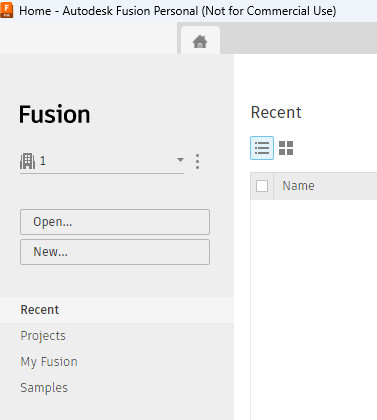


and this is what I see after loading one f3d file from the computer and clicking on the 3x3 icon
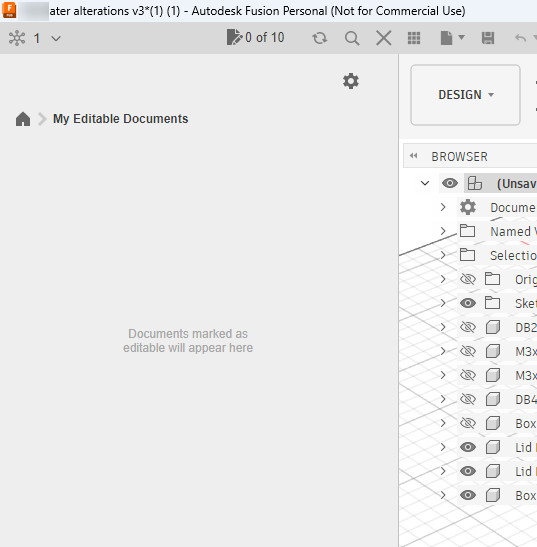


It all looks as I would expect.

Quote
Where does it say that? It is unclear to me how "the program" can be read-only, without reference to any file?

It doesn't say it anymore :) But yes the program started up in R/O mode. So just a file viewer.

I think, contrary to my previous assumptions (which nobody argued with), there is more than one download URL for the "free" version of Fusion. And I was using a URL which produced the 30 day fully functional one, which then ended up as R/O and with all Save/Export options disabled. With the version I now have running, I never had a fully functional version (I judge that from the Export options, which are mostly grayed out, but STEP is available).

That said, I have not checked Ebastler's procedure with a completely new machine, email address and (yes you need that too, although it may give up eventually) mobile number :) I am out of machines and definitely out of mobile numbers ;)

Autodesk have set up a horrible "predatory" system, whereby they will make the program useless for anybody who ever has to open somebody else's f3d file, unless the user is on the same program version, which in the long run means the same OS version. They hacked it so that the f3d file cannot be opened by any older program version even if nothing in the f3d format has been changed. The smart way to do this would be to have a version # for the f3d file itself. Presumably this was done to control bootlegging, because it fairly quickly wipes out any patching of the executable, unless you use it purely for your own projects, in which case you never need to update it.


« Last Edit: January 27, 2026, 05:56:15 pm by peter-h »
Z80 Z180 Z280 Z8 S8 8031 8051 H8/300 H8/500 80x86 90S1200 32F417
 

Online ebastler

  • Super Contributor
  • ***
  • Posts: 7803
  • Country: de
Re: Autodesk Fusion free version - does it do anything beyond viewing?
« Reply #95 on: January 27, 2026, 06:40:18 pm »
Autodesk have set up a horrible "predatory" system, whereby they will make the program useless for anybody who ever has to open somebody else's f3d file, unless the user is on the same program version, which in the long run means the same OS version. They hacked it so that the f3d file cannot be opened by any older program version even if nothing in the f3d format has been changed. The smart way to do this would be to have a version # for the f3d file itself. Presumably this was done to control bootlegging, because it fairly quickly wipes out any patching of the executable, unless you use it purely for your own projects, in which case you never need to update it.

It is fairly common today for software vendors to strongly encourage or even force users to keep their software updated to the current version. There are legitimate reasons for this: It will make product support easier (user support, ensuring compatibility with OS versions, etc.). And it might well be the case that files generated by the new version include features/functionality which the old software version just can't handle; you don't know that in the case of Fusion, right?

But it is certainly good to remember that we are essentially at Autodesk's mercy when we use the free personal license. While there is a local software installation and file cache, Fusion will only run for 30 days without checking in with Autodesk, I believe. They could certainly decide to pull the plug on the free version, or limit it further and introduce a billable hobbyist version.

Given the stunt Autodesk have pulled with Eagle after acquiring it, that is certainly a real possibility. I am painfully aware of it, but use Fusion anyway for my hobby stuff, since I prefer its UI over FreeCad (a lot).
 
The following users thanked this post: thm_w

Online peter-hTopic starter

  • Super Contributor
  • ***
  • Posts: 6058
  • Country: gb
  • Doing electronics since the 1960s...
Re: Autodesk Fusion free version - does it do anything beyond viewing?
« Reply #96 on: January 27, 2026, 09:41:04 pm »
I guess if your only option is a) to rent and b) to pay the full rental, then you don't care about these policies.

The big exception to the above is the win10/win11 issue, where vast numbers of people are forced to chuck away their perfectly good PCs and laptops and buy "win11 compatible" ones. And in this case you have to do that to get file compatibility with others. I know one can install win11 with a hack but then you don't get any win11 updates afterwards.

It is the ability to use Fusion as a free version that gets up one's nose that Autodesk have this level of control :)

FWIW, I bet Autodesk get a lot of stick over the win10/win11 angle, because they have not stopped updates on win10 machines. I've seen an update just today.
Z80 Z180 Z280 Z8 S8 8031 8051 H8/300 H8/500 80x86 90S1200 32F417
 

Offline thm_w

  • Super Contributor
  • ***
  • Posts: 9839
  • Country: ca
  • Non-expert
Re: Autodesk Fusion free version - does it do anything beyond viewing?
« Reply #97 on: January 27, 2026, 10:20:28 pm »
I know one can install win11 with a hack but then you don't get any win11 updates afterwards.

You don't need to hack 11 LTSC to get it to install, and you'll get updates.
I'm fairly sure you get updates for regular win11 install as well, but that may no longer be true.
Profile -> Modify profile -> Look and Layout ->  Don't show users' signatures
 

Online ebastler

  • Super Contributor
  • ***
  • Posts: 7803
  • Country: de
Re: Autodesk Fusion free version - does it do anything beyond viewing?
« Reply #98 on: January 27, 2026, 10:23:52 pm »
I'm fairly sure you get updates for regular win11 install as well, it just *may* prevent future updates.

Yes, I think that threat of "no updates" is just Microsoft spreading FUD for now. I have done a couple of Win 11 installations on "incompatible" PCs via Rufus, and so far they are receiving all the regular updates.
 
The following users thanked this post: thm_w

Online peter-hTopic starter

  • Super Contributor
  • ***
  • Posts: 6058
  • Country: gb
  • Doing electronics since the 1960s...
Re: Autodesk Fusion free version - does it do anything beyond viewing?
« Reply #99 on: January 27, 2026, 10:31:58 pm »
Win11 requires, from memory, the SSE4 CPU (not an issue if less than 10 years old), UEFI, secure boot, and TPM.

It is a matter of debate how far back you have to go to not get TPM but a high end PC or laptop from say 2018 probably won't have it.

If a machine is not 100% compatible then Win11 will need a hack to install. Then, AIUI, IME, you will not get Win11 major updates but will get patches and antivirus updates.

How much it matters to not get major updates is debatable, especially as you can install them manually with the hack again :)

But if say Fusion requires Win11 it probably doesn't care which Win11.
« Last Edit: January 27, 2026, 10:35:31 pm by peter-h »
Z80 Z180 Z280 Z8 S8 8031 8051 H8/300 H8/500 80x86 90S1200 32F417


Share me

Digg  Facebook  SlashDot  Delicious  Technorati  Twitter  Google  Yahoo
Smf


-->