....
Should be easy enough to map out with a meter.
Note that if doing something more ambitious that just re-casing, you can emulate button presses via the serial console or via the TELNET console (not sure if this exists on FW 1.2x+)
Thank you Mike, you're the boss O0
here's what i found:
7+8 = ON/OFF
2+6 = Back
1+6 = PLAY
3+6 = JOY(Center)
4+5 = JOY(Right)
3+5 = JOY(Left)
4+6 = JOY(Down)
2+5 = JOY(Up)
Note: pins are 1 to 8 are like in the picture:
What exactly are you doing with the E4 that you need a smaller case? Sounds like a cool project, but it doesn't seem very practical unless you're 3D printing a new case.
i wanna put it in a rc plane to use it in hunting. Maybe one day i will be able to use it for search & rescue, who knows

I think freak_ge wanted me to post my info, so here it is...
Model: E4 1.1L
Serial: 639217xx
Software: 1.22.0
Cal. Date: April 3, 2014
Ordered through, and shipped by Amazon.com (Lexington, Kentucky fulfillment center). Order placed April 17th and delivered April 19th 2014. Hope this helps!
here's what i found:
7+8 = ON/OFF
2+6 = Back
1+6 = PLAY
3+6 = JOY(Center)
4+5 = JOY(Right)
3+5 = JOY(Left)
4+6 = JOY(Down)
2+5 = JOY(Up)
Note: pins are 1 to 8 are like in the picture:
Looking at that as a matrix, you get:-
| 1 | 2 | 3 | 4 |
| 5 | ??? | UP | LEFT | RIGHT |
| 6 | PLAY | BACK | CENTRE | DOWN |
Make yourself a switch matrix and you've got a secret button to play with (that'll probably do nothing)
If RC mounting you may want to make the entire button panel removable to reduce size and weight further. Off the top of my head I'm thinking extend the existing connector out to a small, rigidly-mounted PCB edge connector such as RS part
745-5842. The switch board would then push-fit into that when you need to push buttons, switch on/off etc. then pull back out for flight.
Loss of access to stored pictures - solution
Taucher has just posted a useful comment on the Teardown thread that I am copying here to avoid it getting lost amongst the mass of pages in that thread.
Taucher Text follows:
Just a short notice for anybody experiencing similar issues:
My E4+ did show problems with the DCIM folder - could not be listed or read over telnet/samba
diskutil unmount, check, remount did not help - still was unable to list contents - not even with "dir" in telnet! -> just stuck
new images were not saved etc.
Solution: changed to RNDIS+MSD mode - there I could read out the contents and recover the images (then I re-formatted the partition)
Battery Charging options for the FLIR Ex series
I also looked for camera batteries of similar design in the hope of modifying a cheaper camera battery charger. The vital information that I was lacking related to the charge management IC that the FLIR battery uses. Using another brand of charger without ensuring management circuit compatibility is risky.
Try
http://hobbyking.com/hobbyking/store/__216__408__Chargers_Accessories-Battery_Chargers.htmlThey sell independent boards, as well as chargers. Note that you do NOT need a balancing charger as this is a single-cell battery pack (presumably, owing to the voltage rating. If they are double-cells, then, they are parallell mounted. I did not try to reverse engineer the battery pack yet.
Also, Adafruit.com offered a one-cell LiIon charging module.
Try also BatteryJunction.com, they sell charging boards, and individual cells, with or without tabs, if ever yours dies-off. (shipping expensive)
Or try DealExtreme (
http://DX.com ) they are big on parts for Makers...
You should note, though, that the included charger is 5V 2A, which packs quite a lot of power. The typical USB port does not provide that kind of juice. (from the top of my head, 500ma for USB2 and 1A for USB3,
for enumerated devices only. Devices that are not recognized by the computer will not be fed as much juice.
So, the included charger can probably charge the 2700ma batterie in fifty minutes, but a regular USB port will take 5-6 hours.
I'd have to crack open the battery holder to see what kind of cell in there, and how much you can push the charging (say, 30 min i.e. 2C, or 15 min i.e. 4C ?)
This may be of use to anyone digging around in the palette files.
The .pal files found in some of the tools use RGB colour space.
The .pal files found on the cameras (and the Mac version of Flir Tools) seem use the YCrCb colour space (look at although yellow.pal from Mac OS FLIR Tools appears to contain RGB information instead, resulting in an incorrect green-to-yellow instead of black-to-yellow palette).
The following formulae pasted into Excel will give you rounded conversions from one to the other. If you create a spreadsheet with the following column headers in A1 to O1 you'll be ready for two tables, the left hand one converting RGB to YCrCb and the right hand one converting back:-
R G B blank Y' Cr Cb blank Y' Cr Cb blank R G B
Paste the following formulae in (these work in LibreOffice, presumably Excel as well):-
E2 (Y'): =ROUND(16+1/256*(65.738*A2+129.057*B2+25.064*C2))
F2 (Cr): =ROUND(128+1/256*(112.439*A2-94.154*B2-18.285*C2))
G2 (Cb): =ROUND(128+1/256*(-37.945*A2-74.494*B2+112.439*C2))
M2 (R): =ROUND((298.082*I2+408.583*J2)/256-222.921)
N2 (G): =ROUND((298.082*I2-100.291*K2-208.128*J2)/256+135.576)
O2 (B): =ROUND((298.082*I2+516.412*K2)/256-276.836)
You can now put RGB into A2-C2 and spit out YCrCb in E2-G2, or put YCrCb into I2-K2 and spit out RGB in M2-O2.
Due to the rounding to whole numbers you'll find that converting RGB to YCrCb then putting the figures in the other table to convert back will sometimes give different figures (even negative figures at the bottom end of the RGB scale) but it'll be close enough, certainly enough to help get your head round the colour space (I can't think in YCrCb but give me three big RGB sliders and I'm sorted).
Formulae are based on the ones here, I've just made them spreadsheet-friendly:
http://en.wikipedia.org/w/index.php?title=YCbCr&diff=prev&oldid=178186629Comparing two versions of yellow.pal and also Rain.pal (RGB) with rainbow.pal (YCrCb, from a camera) the "special colours" seem to have changed places as follows:-
| RGB palette file | YCrCb (camera) palette file |
| ISOTERM1 | Isotherm 1 |
| ISOTERM2 | Isotherm 2 |
| MARKER | not used |
| RESERVED1 | Underflow |
| RESERVED2 | Overflow |
| UNDERFLOW | Below |
| OVERFLOW | Above |
Some palettes have names alongside the colours, but not all (lava.pal doesn't) so these are probably just # comment lines with no function.
Extremely short palettes (such as "medical") don't seem to scale well on the E25 (all the colours stay in about the top 30-40%, with the rest blue) but manually scaling the palette up by duplicating the colours works well. I've just succeeded in converting Medical.pal to a camera-compatible format, the next targets are Glowbow.pal and GreyRed.pal. IronHi.pal and RainHi.pal appear to be some sort of binary format so I can't convert those (yet) but we already have rainhc.pal so RainHi probably doesn't matter, and there's not much difference between Iron and IronHi.
Edit: looks like XLS is an allowed attachment format

These are the help details for the commands on the ThermaCAM E25. Whether they're the same as for the newer cameras, available-but-hidden on the newer cameras or whatever, I don't know, but here they are (E25 hidden commands in red, the unlock code is FLIR's old favourite unlock code they use everywhere else). This is all from the built-in help text (i.e. typing "help" followed by the command name).
ATE0Q0V1: Returning modem-like answers to ease installation
ATH: Dummy command used by PPP disconnection
aadj: Autoadj image
adjmode: adjmode <l | ls | h | lh | oh [| drc | ldrc | drcls | lscale]>
l=level, ls=level+span, h=level+span+histogram, lh = level+histogram, oh=only histogram
alloc: View allocated memory
arp: display, set, and delete arp table entries
autoadj: autoadj <on | off | now>
autonuc: autonuc [on/off]
baudrate: Change baudrate of pSH+ port
usage: baudrate [-p <portnr>] [baudrate]
bit: Built in test
Usage: bit -{V|v|}[D][aAjJpfsiIlrtkKcxfdObQuEGmhnPBLXTYy] {}
Operator input is expected when "capital letter" tests activated
V verboose, display long result during tests
v verboose, display short result during tests
D Display results only
a Run test that need no operator
A Run all test
k MABC Pic
K MABC Joystic/buttons
j MA7C Pic
J MA7C Joystic/buttons
p Power Pic
f Focus
S Shutter
r Filter
l Lens
t Temp Sens
b Battery
i IrdaHw
I IrdaConnect
c Clock
x Expansion Ram
d Flash Disk
O Sound
Q Video
E Left cover buttons
G KeyPad
m Maps
h Image
n Verify
g gain corr
r pix replacement
h histogram
f framesum
P AD ports
B Beep
s StatusLcd
L Laser
X LaserBtn
T Visual
Y VisualImage
y Backlight
R Remote temp
u ViewFinder
blankerr: Get number of too long video interrupts
boot: Reboot system from boot1 - usage boot <baudrate>
bright: Check or set overbright/underbright
bt: Send a button command to PEG: bt [-p <press>] [-r <release>] e
bufstat: Get pNA buffer status
cat: concatenate and display
cd: change working directory
checkdisk: Check and repair damaged flash disk (current directory)
cleartime: Clear task time statistics
clrscr: clear the screen, using TERM value
cmp: perform a byte-by-byte comparison of two files
config: Handle hard configuration
Usage: config [-d] [-s] [-i <file>] [-b <file>] (-d=delete, -s=status, -i=install, -b=backup)
cp: copy files
date: display or set the date
df: Report file system space
dobj: Set/read object distance, "dobj <value>" sets object distance (meter), "dobj" without parameter reads object distance
du: display disk blocks usage
dumplens: Read lens content r(raw)/i(interpreted)
echo: echo arguments to the standard output
eeread: Read from EEPROM on I2C
eewrite: Write to EEPROM on I2C
emiss: Set/read emissivity, "emiss <value>" sets emissivity, "emiss" without parameter reads emissivity
fesdload: Load/Read altera FPGA on FESI/FESD board
fesdread: Load/Read altera FPGA on FESI/FESD board
fesiload: Load/Read altera FPGA on FESI/FESD board
fesiread: Load/Read altera FPGA on FESI/FESD board
file: Determine file type
filetest: Test memory leakage from fopen
filter: Set FPGA filter value (16 bit)
flash: Read S-Record file and write data to FLASH; flash <filename | ftp-URL>
flirppp: Initialize PPP connection. Usage: flirppp
flirppp uses FLIRs modem connection
format: Format FLASH disk
fpa: Direct access to SIM 300 FPA memory
fpaee: Read/Write EEPROM of SIM300 or FESD-FESI
fpasc: Send and receive command to Photon detector
fpasc -d will display CRC and header in replymsg
fpasc <cmd> <byte1>...
fpasc rm <addr> <cnt>: read memory
fpasc wrm <addr> <byte0>... : write memory( DANGER!!)
fpga: Load a new file to FPGA
freeze: freeze/unfreeze image distribution, freeze [on/off] (on default)
gain: Set/read span, "span <value>" sets span, "span" without parameter reads span
getfblock: Get fileblock (computer control only)
getpri: get task priority
grab: Perform a framegrab
graphics: graphics [on/off]
head: display the first few lines of the specified files
help: List or print help for commands
Usage: help [ [-l <letter>] | [-s <string>] | [-?] | <cmdname> ]
i2cread: Read from generic I2C device
i2cwrite: Write to generic I2C device
icon: Display an icon on the screen
To create an icon:
icon [-n <number>] [-x <x>] [-y <y>] [-s <state>] [-p <twinkle period>] [-t <transparent color>] [-o <overbright color>] [-u <underbright color>] [-w] file
To alter an icon:
icon -n <number> [-x <x>] [-y <y>] [-s <state>] [-p <twinkle period>] [-t <transparent color>] [-o <overbright color>] [-u <underbright color>] [-w] [file]
To delete an icon: icon -n <number> -d [-w]
id: id: prints user and group id
ifconfig: configure network interface parameters
irtest: Test IrDA connection
kill: terminate a task
lago: Test command for sim300, loop AGO
latchmode: Set/read latch mode, "latchmode <mode>" sets latchmode, "latchmode" without parameter reads latchmode
lcrs: Test command for sim300, loop CrsValues
level: Set/read level, "level <value>" sets level, "level" without parameter reads level
levelt: Set/read radiometric level, "levelt <value>" sets levelT, "levelt" without parameter reads levelT
load: Load an ELF file into memory; load <filename>
loadpic: Download a new program to PIC; loadpic [-s] <slave address> <filename | ftp-URL>
ls: list the contents of a directory
mainver: Change mainboard version, usage: mainver [<newVersion>]
map: Handle maps
mapmemtest: Map memory test
mboxpos: Set/read mbox position, "mboxpos [<n> [<x> <y> <w> <h>]]"
mboxsig: Read mbox values (signal)
mboxtemp: Read mbox values (kelvin)
memstat: Check status of allocated memory, [-l] for details
mf: Fill memory with data
mfunc: Set/read measure func active on/off
mkdir: make a directory
mount: mount pHILE+ file systems
mr: Read from memory
mv: move or rename files
mw: Write to memory
netstat: show network status
newlens: Update lens calibration
nuc: Non-uniformity correction (create new offset map)
Usage: nuc [-n] [<framesLog2>], where -n = no shutter, <framesLog2> = number of nuc frames log2 (0-7, 5 = default)
osstat: Get all pSOS objects
palette: Set/read color palette (<palette default> to reset) (opt -e -r)
passwd: Change login password
picload: Download a new program to PIC; picload <filename>
ping: send ICMP ECHO_REQUEST packets to network hosts
popd: pop the directory stack
power: Enable 3VD and 8V
ppp: Initialize PPP connection. Usage: ppp [baudrate]
ppp uses standard dial up connection
pppaddr: Set PPP address for Camera and PC
pushd: push current directory onto the directory stack
putfblock: Put fileblock (computer control only)
pwd: display the pathname of the current working directory
pwv: display the current working volume
rcd: Change level in resource tree: rcd <path>
rclone: Clone resources, if possible: rclone <master-path> [clone-path]
rcreate: Create new resource: rcreate [-w] [path]
rdelete: Delete current resource: rdelete [-w] [path]
recall: Recall image file <filename>
reclaim: VFM garbage collect
relhum: Set/read relative humidity, "relhum <value>" sets relhum (0.0-0.99), "relhum" without parameter reads relhum
resedit: Edit resources
rest: Dummy command
I'm here to avoid restarting when you mistyped rset!
restart: Restart system - usage restart <baudrate>
resume: resume a task
rfind: Find resource from substring: rfind <substring>
rlock: Lock resource commands
rls: List resources: rls -h for help
usage: rls [-r] [-l] [-d] resource
-r list recursive
-l list using long format
-d force integer decimal output
rm: remove (unlink) files
rmdir: remove (unlink) directories
route: manipulate IP routing table
rpatch: Patch values into matching resources: rpatch <substring> <value>
rpwd: Print working resource tree level
rset: Set current resource value: rset <path> <value>
rtcdate: Set RTC date and time
runlock: Unlock resource commands: runlock <code>
savelens: Store lens data in lens eeprom/file
setenv: set environment variables
setpri: set task priority
setsize: Set filesize (computer control only)
showpat: Show test pattern 1 - 4 (1 default)
sleep: suspend execution for a specified interval
sound: Generate a beep
span: Set/read span, "span <value>" sets span, "span" without parameter reads span
spant: Set/read radiometric span, "spant <value>" sets spanT, "spant" without parameter reads spanT
spotpos: Set/read spot position, "spotpos [<n> [<x> <y>]]"
spotsig: Read spot value (signal)
spottemp: Read spot value (kelvin)
store: Store current image
Usage: store [-j] [-p] [-e] [-o] <filename>
(-j=JPEG, -p=PNG compression, -e=JPEG only, -o=Without overlay graphics)
supv: Control supervisor; start/stop/unload tasks/libs
suspend: suspend a task
sync: force changed blocks to disk
tail: display the last part of a file
tasklist: Print a list of executing pSOS tasks
taskstk: Get task stack info
tasktime: Get task time statistics
tatm: Set/read Tatmosphere, "tatm <value>" sets Tatm (K), "tatm" without parameter reads Tatm
templog: Temp log
temprange: temprange [highTempC]
temptest: Continuous prints
termecho: Controls terminal echo on pSH+ port
usage: termecho [-p <portnr>] [on|off]
touch: update the modification time of a file
trefl: Set/read Treflected, "trefl <value>" sets Trefl (K), "trefl" without parameter reads Trefl
umount: umount file systems
usbrd: Read (16 bit) reg in USB device
usbwr: Write (16 bit) reg in USB device
verify: Verify file system
version: version [-n item_name]
vfmstat: VFM file system status
videomode: Get/Set video mode to PAL or NTSC
videotest: Activate or deactivate video test picture
Does anyone know if the E5s have the updated firmware as well? I have a new E4. I am thinking about sending it back and getting an E5 to see if I can modify the firmware there. Anyone had a look at the new firmware - is it just a matter of time before it is hacked or is it 'unhackable'? Any advice?
All E series have the same firmware. You may be more likely to find an old stock E5 than an E4 as sales volumes will be lower.
AFAIK nobody has taken a serious look at the latest firmware, and as there are still a few old units out there, and as most people who are interested will already have bought one, there are far fewer people with any interest in investigating it.
Hi all I have already asked Marphy about this.....I have carried out his upgrade (resolution and menu) and it is great generally – thanks to all concerned. Sometimes however, when I switch the camera on the system either stalls (flir screen – not flir special edition screen) or presents me with an error window (I can’t remember what the error says). I then have to pull the battery out wait a while and start it up again. I am not sure whether I should be concerned with this instability or not. Any others have experience of this?
Hi all I have already asked Marphy about this.....I have carried out his upgrade (resolution and menu) and it is great generally – thanks to all concerned. Sometimes however, when I switch the camera on the system either stalls (flir screen – not flir special edition screen) or presents me with an error window (I can’t remember what the error says). I then have to pull the battery out wait a while and start it up again. I am not sure whether I should be concerned with this instability or not. Any others have experience of this?
I've seen this very occaisonally
Thank´s Aurora and everyone for this amazing post.
It looks like there are no functional difference or bugfix between the different FW versions.
According to my investigation, for example the FW 1.19.8 is the same (on the functional
/bugfix side) than the last one. All the newer FW are apperantly just failed tries to close the hack door.
If someone knows more than me, can you please write me a line here below?
Many thanks!
EDIT: I tried to answer this question here:
https://www.eevblog.com/forum/testgear/flir-e4-thermal-imaging-camera-teardown/msg579900/#msg579900
Hey I have an E4 that I bought last Feb and moded. My main question is what happens if you remove the hack? Does it just source the original config file? Maybe I missed someone else asking this in previous pages. Should the serial number change or does it stay the same? I remember using hte CRC files and putting my serial number in there and then executing the exe file, however I never did get the menu hack working because I was afraid to use RDNIS. However I just saw a YouTube video where the individual just dragged and dropped using filezilla. This leads to my question, do I need to completely uninstall everything? Or can someone walk me through backing up my original menu in case for safety, and then install the beta 3 menu only. Note: I would like to do this using filezilla, except previously when doing the resolution mod I used terminal, will this cause an issue? Do both modifications have to be done using terminal or RDNIS
I have read through and tried to search my question, but I may not have used the right key words so i apologize if this a repetitive question. I really don't want to break my camera.
Thanks
Does anyone know if the warranty on these is international ?
Eg if brought in the states is it valid in the uk
thanks
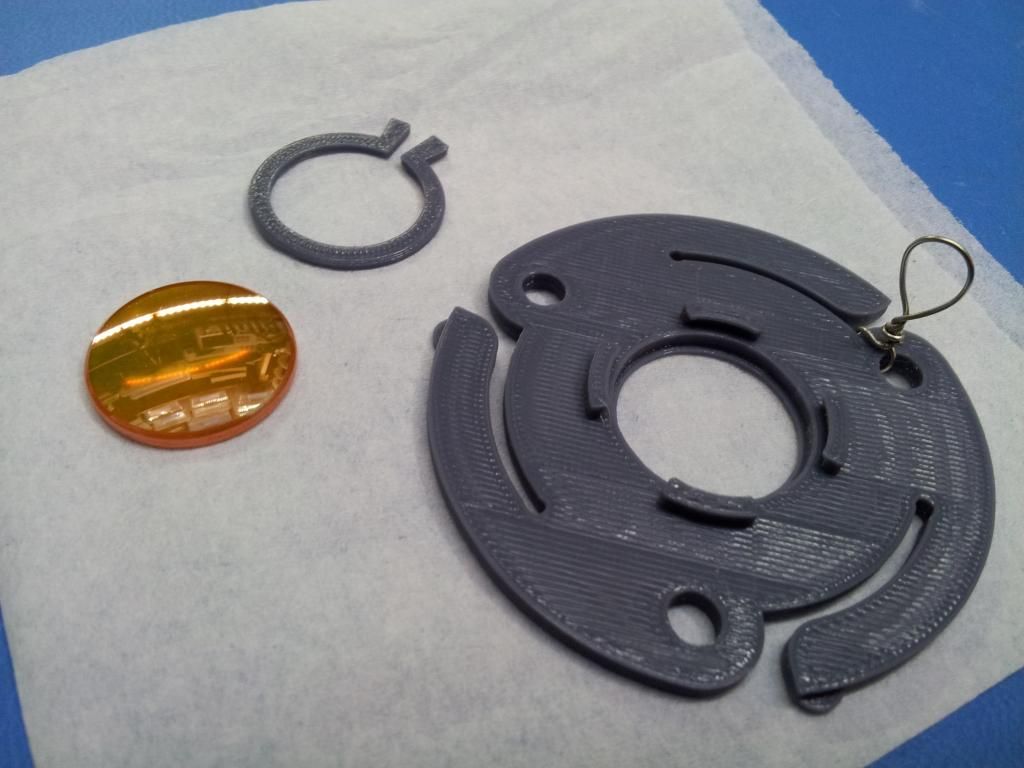
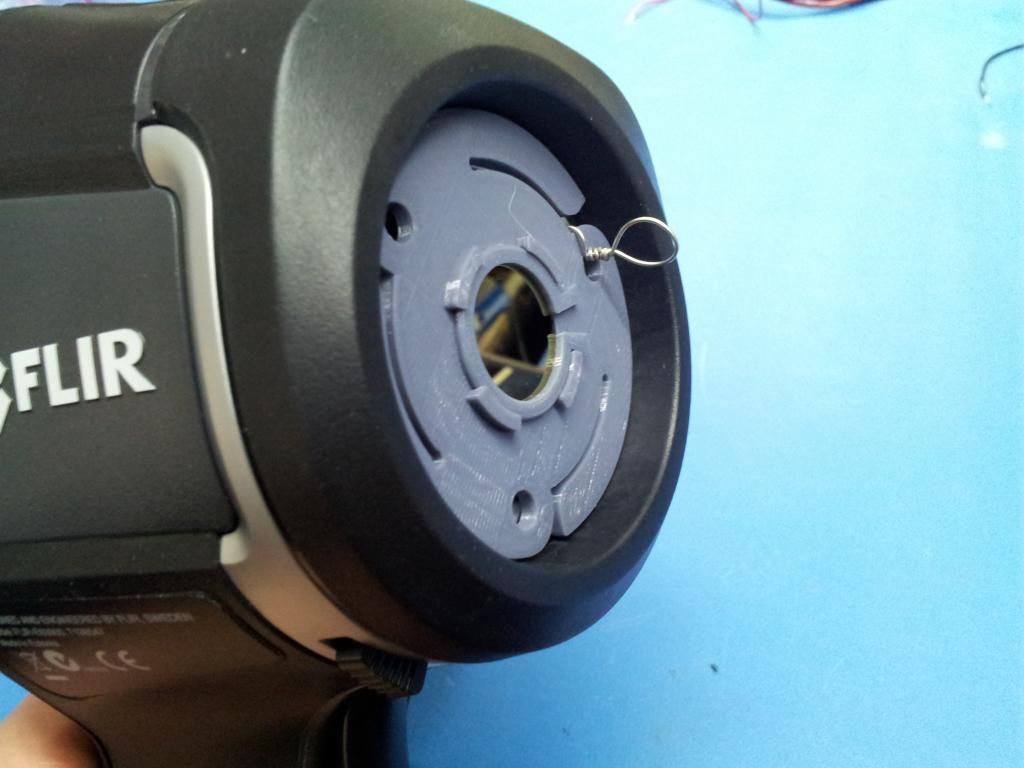
Hi guys, I designed a lens holder for 19 and 20mm lens, it is up on
http://www.thingiverse.com/thing:683107 if you have access to a 3D printer.
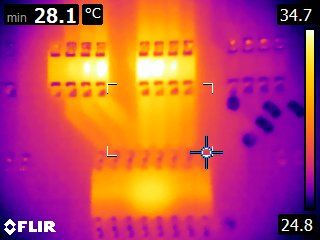
Two quad resister arrays and a darlington transistor array IC.
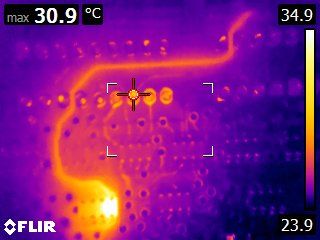
Thin PCB trace with a simulated short.
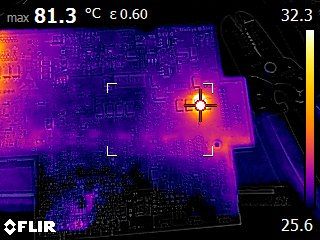
This is not using the lens but I thought it was cool, can you spot the bad capacitor?

Hello, one guy in Poland ask me about flir E4b, "is upgrading look like in Flir E4 2.3?". Is it?
Very useful forum so far guys. From a 3D printing point of view, it's great to see people are actually seeking these services out instead of waiting for a part to come from the manufacturer.
if any of you guys need another Flir-e4, give us a call or take a look at our
http://www.3dquickprinting.com/. We specialise in getting things out the door the same day
Is that Simon I hear with his ban hammer?

