I tried to run the loader program on windows 10, like the video instruction does, Program was running as administrator.
however the "write to device" is not enabled, why?
Is that the factory 1GB SD card is too small?
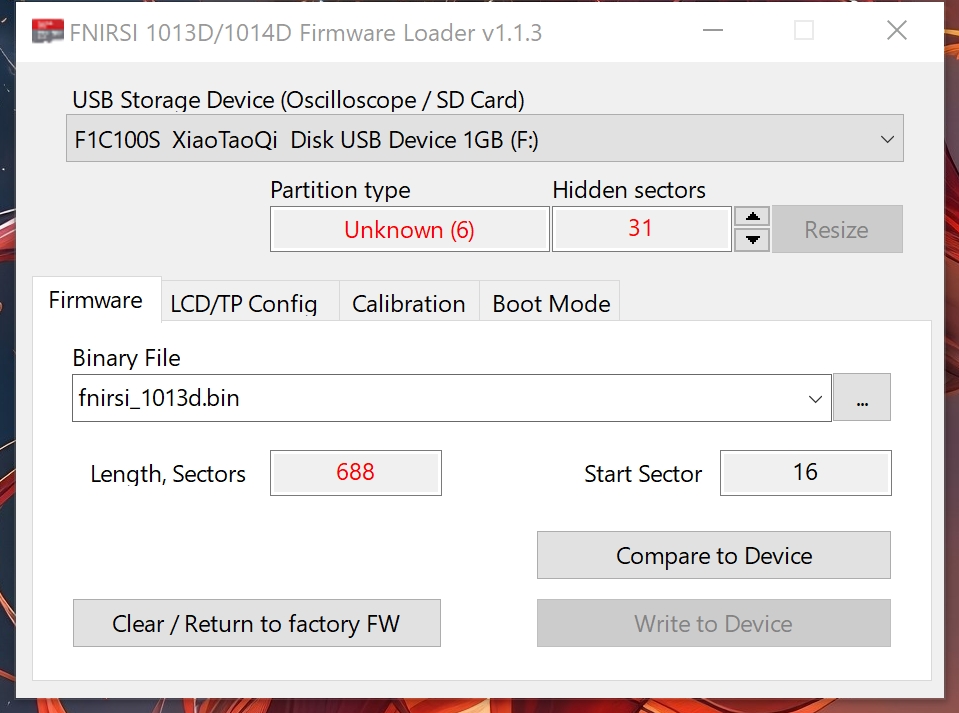
Just look at the red text marks - your card is formatted with 31 hidden sectors (the firmware occupies this hidden space), but the selected firmware requires 688 sectors. So it is impossible to write to it.
Also, your card is formatted with an old partition type - FAT16B (type 6). I am not sure if this partition type is suitable for saving screenshots and waveforms.
The 1GB card itself can be used, I checked, no problem. But first you need to use the bootloader version 1.1.3 to increase the hidden space to 1023 or more sectors (use the up arrow, then the "Resize" button). Then remove/insert the card and format it in Windows, choosing the file system not FAT, but FAT32. That's it.

 Home
Home Help
Help Search
 Login
Login Register


 Topic: FNIRSI-1013D "100MHz" tablet oscilloscope (Read 1459833 times)

