v0.26v4 on ref if load or copy, add button load ref to start up
nice ref feature!

Has the waveform touch v/div scale been removed?
It's split in the center (left/right), only time/div.
Hello Felipe Lacerda

With firmware version 0.26v4

, Have you noticed if the touch screen Vertical sensitivity is lower than before ? - However the reference signals captured move in vertical position perfectly with 0.26v4...... Thanks

Hello Felipe Lacerda With firmware version 0.26v4 , Have you noticed if the touch screen Vertical sensitivity is lower than before ? - However the reference signals captured move in vertical position perfectly with 0.26v4...... Thanks
I can't change the V/div from the main screen, only the V+/V- buttons in the CTRL menu.
The main screen only changes time/div, as shown in the attached image.
Sensitivity? Do you mean response time? The time it takes for the command to be executed after the touch?
I didn't notice anything bad.
Hello Felipe Lacerda, thanks for your response
I understand your 1013D Oscilloscope voltage settings (Firmware 0.26v4
) aren't displaying correctly on the main screen, while mine works fine
I've made a video for you to check if my device is showing anything different link found on YouTube
https://youtu.be/OdftYXY9HeA.
Hope this helps
Even if I switch the movement mode to fast?
My issue is Since updating to firmware 0.26v4, the main input signal on channels 1 and 2 has become much less sensitive to vertical movement via the touchscreen when i try moving the signal vertically—or in some cases, it doesn’t respond at all which is found on https://youtu.be/_I9sXnCaZIY when you have time no rush could check yours & let me know how it is against my video please ? Thank you
OK. You're right.
The cursor only moves vertically if you start touching certain points. Horizontally, the cursor moves anywhere you start touching.
Using "slow mode" only highlights this issue, but it also happens in "fast mode".
*This movement is also a bit smoother in the fnirsi firmware.
My issue remains the same, without V/div control through the main screen, only through the CH menu or CTRL menu.
Hi Felipe Lacerda
Thanks again for your response — I appreciate you checking into the vertical touchscreen issue with the live signal on the 1013D. Looks like you're experiencing the same thing, ( Any one else drop a note on the forum ? ) so thanks for verifying that. Let's hope a future firmware revision
sorts this out.
As for your issue, I’d suggest reverting to a previous firmware try it and reinstalling version 0.26v4. as I’m running that on two of my 1013Ds without any problems with the V/div control on the main screen. Hope this helps
As for your issue, I’d suggest reverting to a previous firmware try it and reinstalling version 0.26v4. as I’m running that on two of my 1013Ds without any problems with the V/div control on the main screen. Hope this helps
Unsuccessfully

Attached short video (sorry for not adjusting focus) but it is enough to demonstrate.
https://mega.nz/file/FwcEiBpS#n_Zl5kfMSpVhm0SL29jcwQNhACrY7i3zMZNeQcQlvFU
My issue is Since updating to firmware 0.26v4, the main input signal on channels 1 and 2 has become much less sensitive to vertical movement via the touchscreen when i try moving the signal vertically—or in some cases, it doesn’t respond at all which is found on https://youtu.be/_I9sXnCaZIY when you have time no rush could check yours & let me know how it is against my video please ? Thank you
OK. You're right.
The cursor only moves vertically if you start touching certain points. Horizontally, the cursor moves anywhere you start touching.
Using "slow mode" only highlights this issue, but it also happens in "fast mode".
*This movement is also a bit smoother in the fnirsi firmware.
My issue remains the same, without V/div control through the main screen, only through the CH menu or CTRL menu.
In your video you can see that you are trying to control ch1 in the area x0 to x60, it doesn't work there, it is reserved for refx waveforms. (If they are turned off, theoretically it could work, but I didn't want to do it that way, because someone would get used to it and then wonder why it doesn't work with refx turned on.) Then you want to move ch1, but you touch it 50 units from the signal axis, that also won't work.
Everything works as it should. The part on the left from x0 to x60 is intended for controlling REFx. The part from x60 to x660 is intended for controlling the ch1 and ch2 signals. X660 to x725 is intended for controlling the trigger. I don't know why 2 functions were written for controlling ch1 and ch2.... In order to be able to control ch1 and other cursors, the TOUCH MUST BE IN THE RANGE x60 to x660, and a maximum of +-y15 from the chx signal axis by the signal marker (1 for ch1 and 2 for ch2). Before version 26v4, it was possible to control the ch1 and ch2 signals everywhere, so if you wanted to move the trigger and there was a chx signal, it moved instead of the trigger, by adding REFx this problem was also transferred to the left side.
v0.26v4 on ref if load or copy, add button load ref to start up
nice ref feature!
Has the waveform touch v/div scale been removed?
It's split in the center (left/right), only time/div.
There was never such an option in any firmware.
Felipe Lacerda
Thank you for sharing your video, The content demonstrates that changing the Time per Division or Sample Rate by using the Horizontal touch screen (centre left or right) is normal, as Stated by Atlan
My video
https://youtu.be/OdftYXY9HeA illustrates the best method for adjusting Voltage per Division (V/div) for each channel input (CH1 & CH2) on the main screen, which has consistently been the standard approach
To access the voltage adjustments for each input signal (CH1 & CH2), please refer to the attached images for reference. 1013D Volts Per Div 1 & 1013D Volts Per Div 2 Hope its of some help
Hi Atlan
thank you for your quick response.
As a 1013D user and forum contributor, I report bugs and share observations after each firmware update if required.
Regarding the touch screen's vertical movement of live input signals on the 1013D, I appreciate your clarification and good detail
The reference signals do move vertically as expected. It appears that the 0.26v4 firmware behaves consistently across different devices, confirming it's not an issue specific to my units
Thanks again for your support—I'll continue using my 1013Ds and look forward to future firmware updates.
Hi,
Thanks for the great work on the alternative firmware.
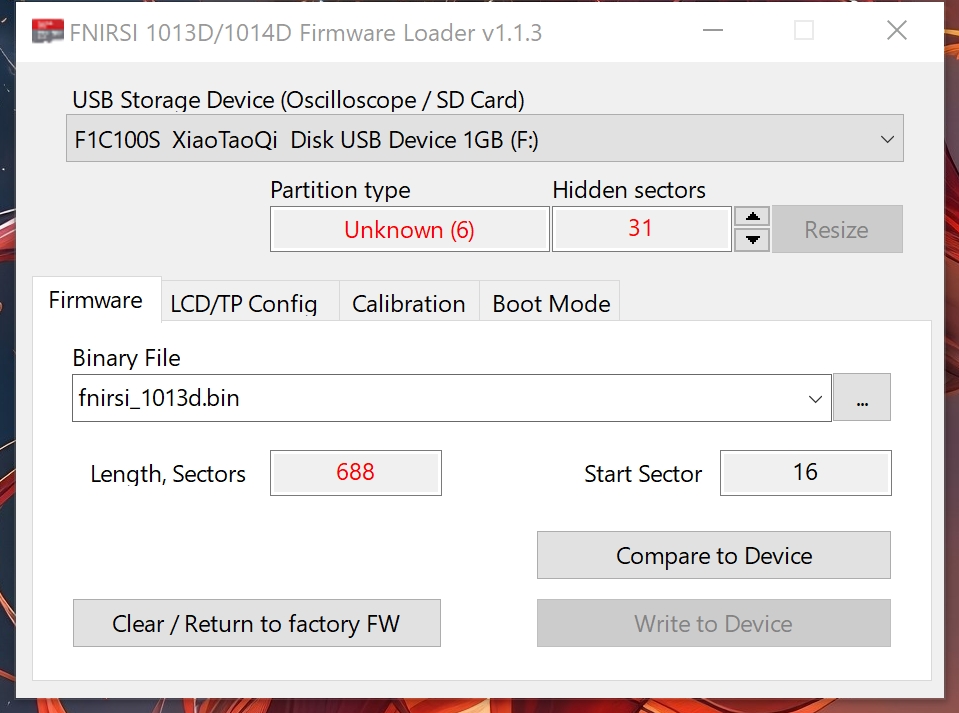
I tried to run the loader program on windows 10, like the video instruction does, Program was running as administrator.
however the "write to device" is not enabled, why?
Is that the factory 1GB SD card is too small?
I also tried with earlier older firmware, enable or disable boot menu, same problem.
The scope already has the latest factory firmware loaded.
Try 0.26v5, the cursors should react faster. Of course, when 8ref waveforms are turned on, it takes a while for uP to draw everything.....
Hi,
Thanks for the great work on the alternative firmware.
I tried to run the loader program on windows 10, like the video instruction does, Program was running as administrator.
however the "write to device" is not enabled, why?
Is that the factory 1GB SD card is too small?
I also tried with earlier older firmware, enable or disable boot menu, same problem.
The scope already has the latest factory firmware loaded.
Try formatting the card, the procedure is in the firmware instructions.
With 1013D Firmware 0.26v5
cursor performance in voltage measurement has improved significantly
Thanks.
I've tried to format the USB drive when connected to windows, after formatting the loader still don't let me write to the device.
And then I reboot the scope and it says SD Error and doesn't want to boot.
I end up find a Samsung 32GB TF card, using card read to load the firmware and plugged into that which is running fine now.
The original TF card is a no name no brand 1GB TF card, guess at that time FNIRSI is still going hard on saving cents on material.
Regarding the firmware instruction, I read the description of the firmware page on github, also read the loader's readme, doesn't seem to mention about format the SD card
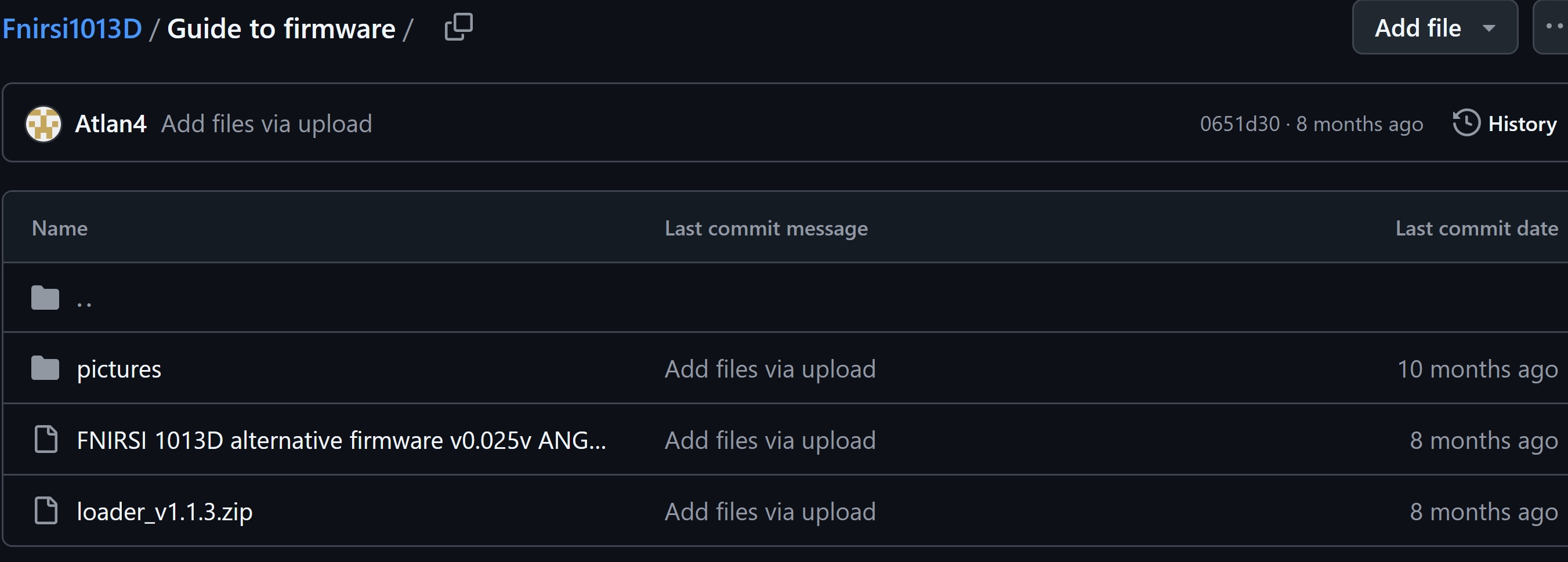
Someone said that developers don't make guides. Why, because no one reads them anyway, and making guides takes a lot of time. There's definitely a GUIDE on github. Also here on the site
Someone said that developers don't make guides. Why, because no one reads them anyway, and making guides takes a lot of time. There's definitely a GUIDE on github. Also here on the site
Thanks, found the guide on github under the folder Guide to firmware.
Actually I did looked there twice but didn't notice that file is the guide itself.
Because it looks like just as another firmware but not a txt or doc. Also the file name been trimmed so it's a bit
tricky to pick up. Anyway I'll read through the guide, thanks again.
Have you had any success using reference capture signals with the Cycle Measurements icon when selecting a specific reference? I'm finding that the Cycle Time per Division is inaccurate because the displayed Cycle frequency keeps fluctuating whenever I try to view a reference signal captured for a cycle.
Record a video of how it doesn't work. Fast shift mode.
Request for Improved Vertical Sensitivity on Live Signals (Channel 1 & 2 – 1013D) Just keep in line with channels icon all is ok
The area to the left of the pink line is used to control the ref waveforms, the area to the right of the pink line is used to control the trigger. In between is the area to control the ch1 signal position. The touch must not be further than +-30 units (above, below) from the signal axis marked by the marker. You are still controlling it wrong, according to the video. Interestingly, when you want to move the ref waveform, you put your finger over the center of the ref signal, but when you want to move the ch1 signal, you do not do that anymore.